

DNS TTL Values: Tutorial & Best Practices
DNS TTL is the hidden dial that determines how long resolvers cache your records. Set it too high and changes propagate slowly. Set it too low and resolver load spikes. Here’s how to get it right.


Denton Chikura

The quick download:
The DNS TTL (Time to Live) value determines how long resolvers cache a record before querying again, a setting that directly impacts both DNS performance and how quickly changes propagate across the internet.
-
TTL controls the balance between caching efficiency and change propagation speed: short TTLs mean faster propagation but higher resolver query load; long TTLs improve performance but slow DNS changes.
-
Different record types warrant different TTL strategies. NS and SOA records benefit from longer TTLs, while A records used in active failover or load balancing should be kept shorter.
-
Dynamic TTL management — gradually lowering TTL before a planned change, then raising it again — is the most reliable way to ensure fast propagation during migrations or IP changes.
-
TTL misconfigurations cause two common failure modes: stale records that keep users on old servers, and excessively low values that overwhelm authoritative servers with unnecessary query volume.
The Internet journey begins with DNS: Whenever you type the name of a website in a browser, open a social media application, or type an email, your computer or smartphone performs a DNS lookup to determine the IP address of the destination to which you want to connect.
The performance of the DNS lookup is the first determiner of how good or bad the end-user’s experience will be with the application or website. Caching is routinely used in DNS implementations to save time by storing recently resolved domain names, saving the time required to convert them to IP addresses. The Time To Live (TTL) value determines how long essential DNS information remains in the cache, so it plays an essential role in determining DNS performance and, thus, the performance of network systems overall.
In this article, we discuss the DNS TTL value in detail and discuss best practices for choosing and modifying TTL values to ensure high network performance.
Summary of key concepts
| DNS resolution | DNS resolution is a process that DNS servers and clients use to convert DNS addresses into IP addresses. |
| DNS record caching and the browsing experience | DNS resolvers and TTL values play an important role in determining the end-user experience. |
| DNS zone file format | BIND DNS zone files follow a special format with different record types and TTL values. |
| Pros and cons of long and short TTL values | There are potential positive and negative impacts of both high and low TTL values. |
| Best practices for choosing TTL values | Following recommendations for configuring appropriate TTL values for different types of DNS records can enhance performance. |
| Service load balancing and failover using DNS | PowerDNS configuration snippets can perform application checks and conduct service failovers. |
| Dynamic DNS TTL | The choice of TTL value impacts dynamic DNS records. |
DNS resolution process
To set the stage for understanding the DNS TTL value and why it’s so important, let’s begin with a backgrounder on how the DNS resolution process works.
There are two types of DNS lookups: recursive and iterative. A recursive query is one where the DNS server performs a complete lookup of the DNS record on behalf of an end client. Iterative lookup is where the DNS server either returns a resource record or refers to another DNS server to perform the lookup.
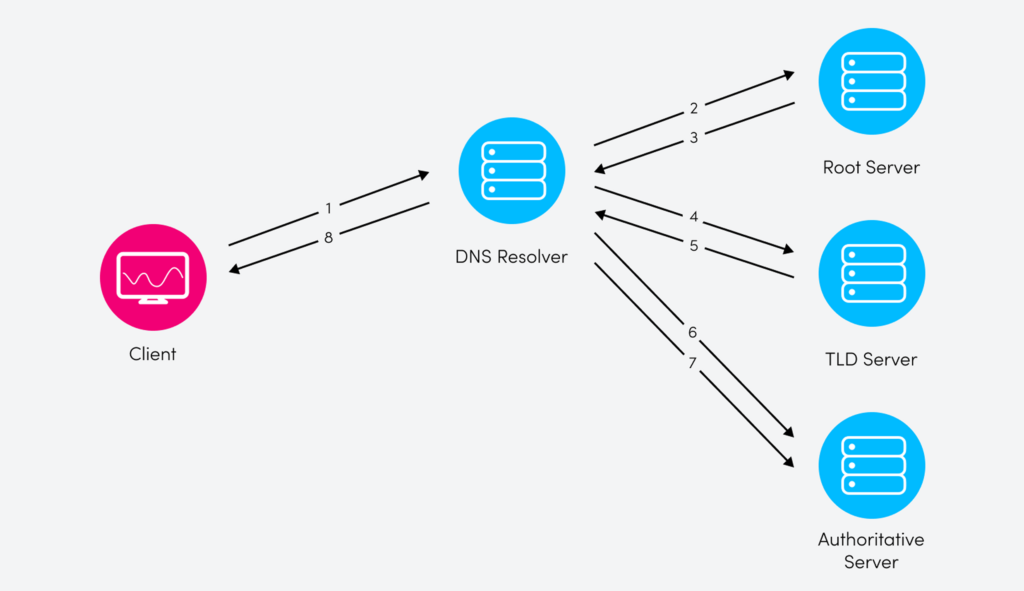
Recursive DNS resolution is typically an eight-step process:
- A client sends a request to its service provider’s DNS resolver to retrieve the IP address of the website.
- The resolver DNS sends a query to the top-level DNS root servers for name servers authorized to provide the IP address of the website.
- The DNS root server sends a response back with the address of the top-level domain (TLD) servers.
- The resolver then sends a request to the TLD server.
- The TLD server returns the authoritative name server for the website domain.
- The resolver then queries the nameserver to retrieve the website’s IP address.
- The address is returned to the resolver.
- The website address is provided to the requesting client.
Upon completion of the resolution process, the client connects with the web server using the provided IP.
DNS record caching and the browsing experience
The amount of time spent on getting the IP address directly impacts the browsing experience on the client, which is why DNS resolvers cache the answers returned to the client to make the resolution process more efficient and provide a better user experience. This cached answer can then be sent back to the next client requesting the address of the same website.
DNS records are configured with a Time to Live (TTL) value that specifies how long the DNS resolution record remains in the cache and when it needs to be refreshed. Choosing the right value is a balance between maintaining high performance and ensuring that the answers stored in the cache are updated and refreshed regularly.
DNS zone file format
The Domain Name System is a hierarchical structure that spans every domain name in the global Internet. Because of its enormous size, it is necessary to divide DNS into zones, which are specific portions of the overall namespace that are typically managed by a specific organization. For example, an organization called MyDomain might be responsible for the DNS zone mydomain.com.
The core information about how a particular DNS zone functions is stored in its DNS zone file. The zone file includes parameters that control the zone’s operation, including the mappings of DNS names to their respective IP addresses. Importantly, for our purposes in this article, the zone file also specifies different types of TTL values that are used to control DNS caching; as mentioned above, these values play a key role in DNS and thus site performance. Shown below is the configuration file format for a domain name configured in BIND DNS. You can see that the default TTL value for the zone is right at the top of the file; in this case, it is three days. This TTL is used as a default for all DNS resource records in the zone unless explicitly overridden (as we’ll see in a moment).
$TTL 3d    ; default TTL for zone
$ORIGIN mydomain.com.

@       IN      SOA     ns1.mydomain.com. hostmaster.mydomain.com. (
                                2023021001      ; serial number
                                6h              ; refresh
                                15m             ; update retry
                                4w              ; expiry
                                1h              ; minimum
                                )

;NAME   TTL     CLASS   TYPE    Resource Record

                IN      NS      ns1.mydomain.com.
                IN      NS      ns2.mydomain.com.

                IN      MX      10 mail.mydomain.com.

ns1             IN      A       192.168.10.11
ns2             IN      A       192.168.10.12
mail    1d      IN      A       192.168.10.13
www     1800    IN      A       192.168.10.16
app     300     IN      A       192.168.10.10
After the ORIGIN record, which specifies the zone domain name, there is a Start of Authority (SOA) record that contains administrative information for the zone. The SOA record has a specific syntax and contains the following information:
- Primary name server of the domain
- Administrator email address for the domain (but specified using “.” instead of “@”)
- Serial number to keep a record of when the domain information was changed
- Refresh timer for the secondary name servers to check with the primary if the zone information is changed
- Retry timer for the secondary if the primary becomes unresponsive
- Expiry timer used to expire the domain information from the secondary if the primary is not available for the mentioned duration
- Minimum time for which the DNS resolvers should cache a negative answer from the authoritative server
DNS record syntax and TTL values
DNS resource records have the following syntax:
NAME TTL CLASS TYPE Resource Record The TTL value in the record is optional; if not specified, the default value used is the one defined as the zone TTL at the top of the zone file. The TTL value is specified in seconds unless it is suffixed with m (minutes), h (hours), d (days), or w (weeks).
Pros and cons of long and short TTL values
The TTL value directly impacts the time it takes for updates of DNS records to be propagated. A longer TTL value means that the information provided by the authoritative DNS servers remains cached by DNS resolvers for more time. A smaller value means more frequent updates.
The benefit of a long TTL time is less load due to fewer queries being served by the authoritative servers. In addition, if there is any outage of the authoritative DNS, this will not impact the DNS resolution because these records remain cached on the resolvers. This results in a better website browsing experience for the end user.
The downside of a long TTL value is that it imposes a delay in propagating any changes in the DNS records. This can also lead to errors and other incorrect behavior until the TTL value of the cached record expires.
Unsurprisingly, short TTL values have the opposite pros and cons of long ones. Short TTL values mean that changes to DNS records are reflected much quicker. The drawback is that there is more load and dependency on the authoritative DNS servers.
Shorter TTLs will also make the DNS resolvers keep records for a shorter time, resulting in repeated queries to the authoritative DNS servers and thus causing delays in DNS resolution and longer application load times overall.
Best practices for choosing TTL values
Longer TTL values are best used for records that do not change frequently and/or are part of a stable and static infrastructure. Shorter TTL values are better for records that are expected to change frequently.
The following are specific recommendations for the TTL values of different resource records:
- Name Server records (NS): The name server records for a domain name are typically long-lived. These are defined as glue records in the TLD servers and are rarely expected to change. The NS record TTL can be specified as a matter of days (typically 1-3).
- Mail Exchanger record (MX): The mail servers for domains are supposed to be part of stable infrastructure, and typically, the TTL for the MX record is configured with a higher value than that used for other application records. Also, multiple mail exchangers can be used, which results in higher reliability for email delivery. The MX record TTL can be defined in hours (12-24).
- Alias record (CNAME): This record is used to define aliases for different DNS records. The most commonly used is www.mydomain.com, which points to the mydomain.com record. The address of mydomain.com can change, but the alias pointing toward this record is rarely updated. The TTL value for CNAME can be defined in hours (12-24) or days (1-3).
- Address record (A/AAAA): This record provides the mapping of a name to an IPv4 (A) or IPv6 (AAAA) address for a resource. The address can be for an infrastructure resource or an application endpoint, and the TTL values vary depending on the deployment methodology. The TTL can be longer (hours or days) for static applications, but for applications deployed in high availability and failover scenarios, the TTL values are kept short (minutes).
Recommendations for changing long-lived records
There are scenarios where you need to change records that have long TTL values (e.g., a change to an email service or authoritative DNS service), and there is a need to reflect the change more quickly than would normally occur with the configured TTL. In such scenarios, it is always recommended to do proper planning and perform changes in four steps:
- Plan a maintenance activity time window when you would perform the service switchover. The preferred window should have a lower possibility of service impact in case of any unexpected issue. In addition, the time window should be planned farther ahead in days or hours than the configured TTL value.
- Reduce the TTL of the record to a shorter value (minutes) well ahead of time. This is to make sure that the records in DNS resolvers expire and the records are cached with new shorter TTL values.
- Change the resource record, which should be reflected within minutes because the TTL value of the record was reduced in step 2. This will allow the change to be observed for success or failure quickly.
- If the change succeeds, revert the TTL to the original value; if it fails, the resource record can be changed back to the original value, and the service can be restored much more quickly. You can plan another activity window after correcting the problems and going through steps 1-4. In any case, you should change the TTL value to the one before the change activity.
Service load balancing and failover using DNS
In the modern world, where service availability is a critical part of the end-user experience, applications are being deployed using high-availability designs. To enable load-balancing and automatic failover of services, DNS records can be used to redirect end-user traffic toward multiple servers and perform record changes when any of the application endpoints go up or down. The TTL value attached to the resource record determines how quickly the change of record will affect the end user.
A PowerDNS authoritative server supports dynamically generated DNS records based on requesting client IP or location, server availability, or other factors. These records are generated using LUA code snippets.
Shown below is an example resource record configuration of the PowerDNS server. The record is configured to perform a continuous health check (ifurlup) of the web service (web.domain.com) on multiple endpoints (172.16.16.20 and 172.16.17.30). The configuration returns all the IP addresses that pass the health check. The record has a TTL value of 120 seconds, and whenever there is any change of status in any endpoint, the authoritative server will provide updated records that will be reflected on the DNS resolvers after the expiration of the TTL value.The second record performs the GeoIP location lookup of the incoming DNS request. If the client IP belongs to the US countryCode, the IP addresses of US-based servers are returned; if the request is from another part of the world, the IP addresses of servers outside the US are returned. The information can be updated every 5 minutes (TTL of 300 seconds).
web.domain.com	120	IN	LUA	A "ifurlup('https://domain.com/',
					{'172.16.16.20', '172.16.17.30'} )"

app.domain.com	300	IN	LUA	A ";if countryCode('US')
				then return {'172.16.16.20', '172.16.17.30'}
				else return {'172.16.18.30', '172.16.19.40'}
				end"
Dynamic DNS TTL
Dynamic DNS is a mechanism where one can assign a DNS domain name to a dynamically changing IP address. DDNS is typically used to run an Internet-facing service on a residential broadband connection where the IP address is dynamically assigned by the ISP.
Using DDNS requires signing up with one of the DDNS service providers, which typically offer both paid and free services. Whenever an IP address changes at the client end, the IP needs to be registered with the DDNS provider, and the new resource record value needs to be reflected. The paid service typically allows small TTL values (5 minutes), while the free services have longer TTL values (15-60 minutes).
To use DDNS, you require either a client-end application or DDNS configuration in your Internet router. The application or router registers the client’s Internet address with the DDNS service provider. When the client’s Internet address changes (typically after a DHCP lease expires), the DNS resource record will become invalid, and the hosted application will remain inaccessible until the TTL values expire and the new record is reflected within the DNS resolvers. Important hosted applications might necessitate subscribing to a paid DDNS service to ensure faster updates.
Conclusion
This article covers the baseline recommendations of TTL values for different DNS record types. The configuration of DNS TTL values must be carefully planned based on the requirements of the infrastructure, load management of the authoritative DNS servers, the frequency of changes of information, and the required end-user experience.
CHAPTERS
NEWSLETTER
Subscribe to our newsletter
Get the latest blogs, whitepapers, eGuides, and more straight into your inbox.
SHARE
Stop guessing about DNS performance. Start knowing.
LogicMonitor continuously monitors your DNS infrastructure from multiple global vantage points, giving you the resolution-time data and availability insights you need to optimize confidently.
FAQs
What does DNS TTL stand for and what does it control?
TTL stands for Time to Live. In DNS, it specifies how long (in seconds) a resolver or client should cache a DNS record before expiring it and querying the authoritative server again. It controls the balance between caching efficiency (performance) and how quickly DNS changes propagate across the internet.
What happens if I set my DNS TTL too low?
Very low TTL values (under 60 seconds) force resolvers to query your authoritative nameservers much more frequently, increasing load on your DNS infrastructure and potentially increasing resolution latency for end users. For most stable records, TTL values between 300 and 3600 seconds provide a good balance between performance and responsiveness.
What happens if I set my DNS TTL too high?
High TTL values mean DNS changes propagate slowly — if you update an A record, the old IP address will continue to be served from resolver caches for as long as the old TTL value specified. For DNS migrations or failover scenarios, this can mean extended downtime or traffic misdirection affecting users globally.
What is the recommended TTL strategy for planned DNS changes?
Before a planned change, reduce your TTL to a low value (60–300 seconds) and wait at least as long as the previous TTL for all resolvers to expire their cached copies of the old record. After making the change, verify propagation globally, then raise the TTL back to your normal value to restore caching efficiency.

By Denton Chikura
Technical Writer

Denton Chikura is a technical writer and longtime observability advocate focused on helping site reliability engineers and engineering teams discover the tools and capabilities that strengthen internet resilience. He works at the intersection of monitoring, performance, and infrastructure to make complex systems more understandable and usable, bridging the gap between deep technical detail and real‑world operations. His goal is to help teams build faster, detect issues earlier, and recover smarter, ultimately making the internet a better, more reliable place for everyone.
Disclaimer: The views expressed on this blog are those of the author and do not necessarily reflect the views of LogicMonitor or its affiliates.
© LogicMonitor 2026 | All rights reserved. | All trademarks, trade names, service marks, and logos referenced herein belong to their respective companies.
