

DNS Health Testing: Best Practices for Network Stability
DNS health testing validates accuracy, performance, security, and propagation — not just whether resolution works. Here’s how to build a comprehensive DNS health testing approach for your infrastructure.


Denton Chikura

The quick download:
DNS health testing goes beyond checking whether resolution works — it validates accuracy, performance, security, record integrity, and propagation across nameservers, ensuring DNS infrastructure operates correctly before problems reach end users.
-
DNS health testing validates multiple dimensions simultaneously: resolution accuracy, response time thresholds, server uptime and consistency, record integrity across all nameservers, and security exposure.
-
Regular resolution testing from multiple geographic locations reveals regional issues, CDN misconfigurations, and propagation delays that single-location tests would miss entirely.
-
Security testing should check for hijacking vulnerabilities, cache poisoning exposure, unauthorized record changes, and DNSSEC misconfiguration — not just whether the domain resolves.
-
Combining automated continuous monitoring with periodic manual verification using `dig`, `nslookup`, and DNSSEC validators provides the most complete picture of DNS health.
For almost forty years, the Domain Name System (DNS) has been translating human-friendly domain names to IP addresses and back, making the Internet usable and accessible to all. Beyond web browsing, it supports other communication technologies like email, voice over IP (VoIP), content delivery networks (CDNs), and cloud services. DNS provides ease of use and scalability as it resolves queries in a distributed hierarchical manner.
DNS health tests are essential to a network strategy to ensure correct operation and proactively address potential disruptions. This article explores best practices in DNS health testing and tools that can support this approach.
Summary of key DNS health test concepts
| Concept | Description |
|---|---|
| Regular DNS resolution testing. | Periodically verify that DNS queries resolve correctly and within acceptable response times. |
| Monitor DNS server performance. | Continuously track DNS server response times and uptime to detect latency or outages before they impact users. |
| Check for DNS security vulnerabilities. | Run security checks to identify risks such as DNS hijacking, cache poisoning, and unauthorized changes to DNS records. |
| Validate DNS record integrity. | Ensure DNS records of all types are accurate, up to date, and propagated correctly across name servers. |
| Test from multiple locations. | Conduct DNS tests from various geographic locations to detect regional resolution issues and ensure global reachability and availability. |
How does DNS resolve a domain name?
On the interface settings of a network device, you typically configure a DNS server and possibly an alternate DNS server.
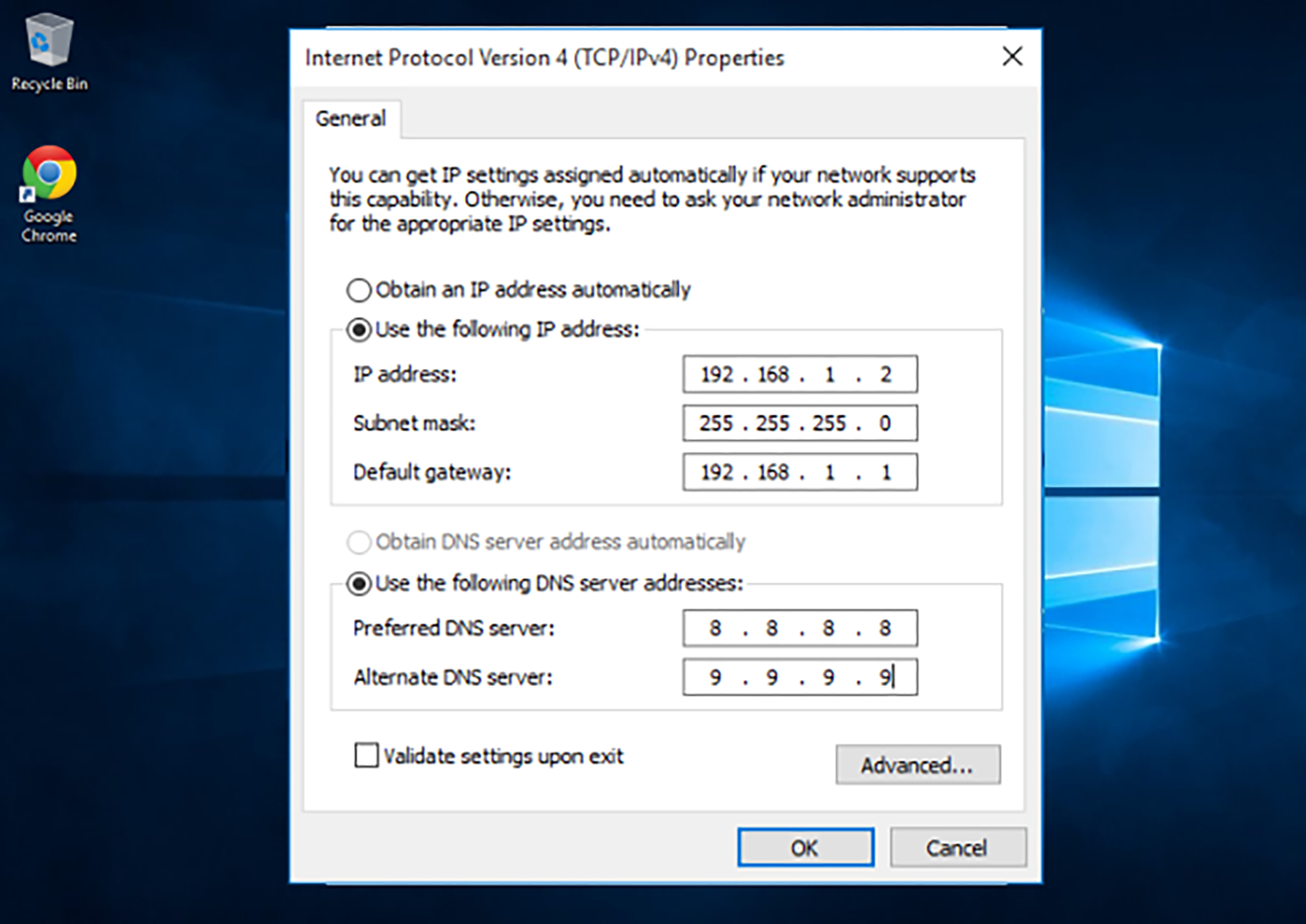
Your device uses these settings to allow DNS to operate. For example, if you enter https://www.logicmonitor.com/demo in your web browser, the computer will send the host portion of that URL (i.e. www.logicmonitor.com) to the configured DNS server. The DNS server determines the IP address corresponding to the name through a domain resolution process. Your browser can then begin communicating with the web server located at the address..
Hierarchical DNS structure
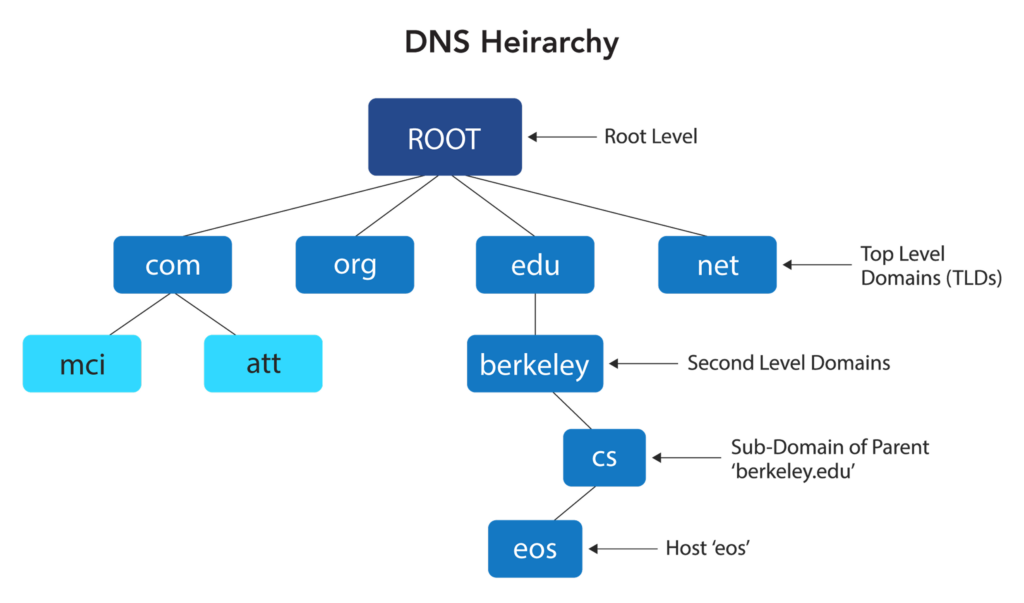
A single DNS server cannot know all the domain names and the IP addresses to which they map. If the DNS server you configure on your PC doesn’t know the IP address to which the requested domain should be translated to, it requests it from the worldwide DNS system on your behalf. The DNS system has a distributed and hierarchical structure to manage the millions of websites in the world today.
The process is as follows:
- When a DNS query starts, the root server is initially contacted.
- This route server directs the query to a top-level domain (TLD) server, which serves the corresponding TLD.
- The corresponding TLD server then forwards the request to the appropriate second-level domain server, which responds with the IP address corresponding to the queried domain.
This is just a simplified description. This hierarchy has additional levels, including subdomains, handled by the second level or additional DNS servers. DNS propagation is the time it takes for DNS record updates to propagate throughout the Internet.
DNS records
Within each DNS server, there are what are known as records. Different types of records are used for different purposes. For example:
- A Record maps a domain name to an IPv4 address
- AAAA Record maps a domain name to an IPv6 address
- CNAME Record maps one domain name to another
- MX Record specifies mail servers for email routing
- TXT Record holds arbitrary text data, often used for security settings
DNS features
DNS is not just about domain resolution. Over the years, it has become a more complex yet robust system, delivering many different features. For example:
- Dynamic DNS (DDNS) capabilities allow servers with changing IP addresses (such as residential services) to maintain a consistent hostname for remote access.
- DNS caching is when resolvers store previously queried DNS records in their cache to reduce future lookup times. The configured time to live and other factors of this feature may further affect efficiency and performance.
- DNS forwarding is when a DNS server passes queries to another server rather than resolving them itself. This, too, can affect security and efficiency.
Additionally, DNS recursion can occur when a DNS resolver queries multiple servers on behalf of a client, potentially negatively impacting performance. The coexistence of IPv4 and IPv6 also complicates address resolution processes and must be considered.
These and many more aspects of DNS can and should become part of a DNS health test strategy.
DNS health testing approach and best practices
Since DNS serves as the backbone of many services that leverage the Internet, any failure or degradation in its performance can lead to accessibility issues, increased latency, and even security vulnerabilities. However, DNS health testing is an often overlooked aspect of network monitoring and proactive maintenance. To ensure resilient and highly available networks, you must adopt a structured approach to DNS health testing. Consider adopting the following best practices.
Test regularly
DNS health testing relies on periodically verifying that DNS queries resolve correctly and within acceptable response times to determine the current operational status.
This process should incorporate both black-box and white-box testing. Black-box testing observes real-life DNS queries during normal operation and measures response times. In contrast, white-box testing generates DNS requests for partial or full resolution from root servers to evaluate the time required for each process step.
Automated DNS testing takes place at regular intervals to measure consistency and performance.
Examine DNS server performance
Continuously track DNS health and testing response times for DNS servers that fall under the jurisdiction of an ISP. You can detect server degradation early on your own networks and respond immediately to incidents. You can also detect DNS service degradation on neighboring servers that do not fall under the organization’s jurisdiction but are used to respond to DNS queries. In such cases, you can notify those network administrators to resolve issues with broader implications.
DNS security issues
When we think about DNS, we don’t often think about security. However, DNS is a prime target, especially for DDoS attacks that seek to disable the service or DNS hijacking, where attackers attempt to redirect users to malicious websites, intercept their traffic, or disrupt network services.
DNS health tests must incorporate frequent testing for security vulnerabilities, including the adequate use of DNS security extensions (DNSSEC) to authenticate DNS responses and prevent tampering. Conduct periodic security assessments to detect potential weaknesses before they can be exploited.
DNS record integrity
DNS servers maintain DNS records that are used to resolve DNS requests. Misconfigurations or outdated records may result in failed lookups, service disruptions, and accessibility issues.
Ensure that all DNS records are accurate, up to date, and properly propagated across all name servers. Conduct regular audits to compare current records against their original configurations and identify discrepancies. This proactive approach helps maintain record correctness, allowing DNS to resolve issues correctly across the board.
Test from multiple locations
DNS is a worldwide system, and the physical location from which a query is made directly impacts response speed and reliability. For this reason, conducting DNS health tests from various locations is essential to gaining a complete picture of the system’s operational status.
Test from multiple locations to pinpoint regional outages more accurately. Distributed monitoring tools can evaluate DNS performance from multiple geographic vantage points to detect inconsistencies and latency variations.
Remain proactive
A DNS failure does not typically result in immediate downtime, as many servers store DNS records in their cache for extended periods, giving a certain grace period. With the appropriate level of proactivity, many DNS outages can be dealt with before any user is aware of them. A proactive approach, combined with these testing best practices, results in a more robust service and higher availability and uptime.
Tools for DNS health testing
DNS health testing can be achieved using various tools. Some can be manually applied to perform sample tests in multiple areas. These include:
- Command-line utilities such as nslookup and dig are available on Windows and Linux systems and other vendor devices.
- DNSViz is a free online tool that can help visualize a specific DNS lookup process more completely.
- Google’s Namebench is a free and open-source tool for measuring the speed and reliability of various public DNS resolvers.
These tools are helpful for quick tests for specific lookups. A more complete monitoring platform is required for more comprehensive solutions that include automated DNS health tests and automatic anomaly detection.
One such solution is LogicMonitor’s Catchpoint, which allows organizations to analyze DNS resolution from multiple global vantage points, detect latency issues, and ensure accurate DNS record propagation. By providing real-time alerts for malfunctions, it can help network administrators quickly and proactively address potential outages or performance degradation before they impact users.
Last thoughts
DNS health testing is often overlooked when it comes to network performance, reliability, availability, reachability, and security. DNS, however, is among the most important network services on the Internet and requires a comprehensive strategy for health testing, maintenance, and monitoring. By implementing these best practices, you can achieve proactive issue resolution and deliver a seamless and secure experience to users worldwide.
CHAPTERS
NEWSLETTER
Subscribe to our newsletter
Get the latest blogs, whitepapers, eGuides, and more straight into your inbox.
SHARE
From reactive to proactive: better DNS visibility starts here
LogicMonitor’s unified observability platform brings together DNS health testing, real-time alerting, and historical trending so your team can catch and resolve DNS issues faster.
FAQs
What is DNS health testing?
DNS health testing is the practice of proactively verifying that DNS infrastructure is operating correctly by running checks covering resolution accuracy, response time, server availability, record integrity, and security configuration. It differs from passive monitoring in that it actively generates test queries to validate behavior rather than just observing production traffic patterns.
What should a comprehensive DNS health test include?
A complete DNS health test should verify: that queries resolve to the correct IP addresses, that response times are within acceptable thresholds, that all authoritative nameservers return consistent answers, that DNSSEC signatures validate correctly if implemented, that zone transfers are functioning and properly restricted, and that no records have been unexpectedly modified or removed.
Why is testing from multiple geographic locations important?
DNS behavior can vary significantly by location due to anycast routing, CDN configurations, and regional nameserver placement. Testing only from a single location can miss issues affecting users in specific regions — such as a failed anycast node, a misconfigured regional resolver, or slow propagation of recent record changes to geographically distant nameservers.
What tools are commonly used for DNS health testing?
Common tools include command-line utilities like `dig` and `nslookup` for manual testing, web-based tools like DNSChecker.org and intoDNS for propagation verification, DNSSEC validators like Verisign’s online tool for checking signature validity, and continuous monitoring platforms that automate DNS testing from multiple global locations and alert on failures or threshold breaches.

By Denton Chikura
Technical Writer

Denton Chikura is a technical writer and longtime observability advocate focused on helping site reliability engineers and engineering teams discover the tools and capabilities that strengthen internet resilience. He works at the intersection of monitoring, performance, and infrastructure to make complex systems more understandable and usable, bridging the gap between deep technical detail and real‑world operations. His goal is to help teams build faster, detect issues earlier, and recover smarter, ultimately making the internet a better, more reliable place for everyone.
Disclaimer: The views expressed on this blog are those of the author and do not necessarily reflect the views of LogicMonitor or its affiliates.
© LogicMonitor 2026 | All rights reserved. | All trademarks, trade names, service marks, and logos referenced herein belong to their respective companies.
