Automated Diagnostics and Remediation: From Detection to Resolution
Automate diagnostics and remediation the moment alerts fire, capture critical evidence, cut MTTR, and resolve common issues before users feel the impact.
Automated Diagnostics & Remediation reduces MTTR by closing the gap between detection, diagnosis, and resolution.
Capture evidence at the moment of impact. Scripts run the second an alert fires, preserving logs, processes, and queries before they disappear.
Diagnose and fix issues automatically. Go beyond insight—trigger predefined remediation actions to resolve incidents instantly.
Cut MTTR (and human intervention). Engineers skip manual triage and repetitive fixes, focusing only on what truly needs attention.
Turn alerts into outcomes. Diagnostics and remediation workflows attach directly to alerts with full history and audit trails.
More than faster troubleshooting. This is the shift to autonomous operations—where systems don’t just detect problems, they resolve them.
The Dreaded Middle of the Night Alert
Every IT operations team knows the pressure. When a critical alert hits at 2 a.m., it’s a race against the clock to find the root cause before users feel the impact. But gathering diagnostic data—and then manually fixing the issue—can eat up critical minutes.
That manual gap between detection, diagnosis, and resolution is exactly what Automated Diagnostics & Remediation eliminates.
LogicMonitor’s latest innovation doesn’t just enrich alerts with context, it takes action. By combining real-time diagnostics with automated remediation workflows, teams can resolve common issues instantly, reduce mean time to resolution (MTTR), and dramatically cut alert fatigue.
Why We Built Automated Diagnostics & Remediation
You asked, we listened. While LogicMonitor already excels at monitoring and alerting, customers wanted to go further—not just identifying issues faster, but fixing them faster, and automatically.
Automated Diagnostics was the first step—capturing real-time context at the moment of failure.
Now, with Automated Remediation, we’re closing the loop by automatically applying remediation steps to resolve the failure. Together, they create a continuous workflow: detect → diagnose → remediate
We’re helping customers move beyond troubleshooting into true automation—where common issues can be identified and resolved before engineers even get involved.
Ed McGowan
Product Manager, LogicMonitor
How It Works
At the center of this capability are enhanced DiagnosticSources, now extended with remediation workflows in RemediationSources. These define what data to collect and what actions to take when an alert occurs.
Key Capabilities
Automated or manual execution: Trigger diagnostics and remediation on alert or run them ad hoc.
Integrated remediation workflows: Execute predefined actions like restarting services, clearing processes, or scaling resources.
Alert enrichment: Diagnostic and remediation results attach directly to alerts for immediate visibility.
Historical context: View past diagnostic and remediation activity for recurring issues.
RBAC and portal-level controls: Ensure safe, authorized automation.
Full audit trail: Every diagnostic and remediation action is logged with user and resource details.
Get more details in the Automated Diagnostics and Remediation Product Brief
To help teams get started fast, LogicMonitor includes out-of-the-box DiagnosticSources to collect information and remediation-ready workflows for common use cases:
Top CPU and memory processes
Top bandwidth-consuming applications
Top database queries
Database blocked processes
Network traceroute and interface diagnostics
Service restart workflows
Process cleanup and threshold-based actions
Recent user privilege changes
Included RemediationSources for automated actions:
Kill Windows process
Launch Windows / Linux process
Restart Windows / Linux device
Suspend / Resume Windows Server Cluster Node
You can test, view, or export results directly from the module interface and customize workflows to match your environment.
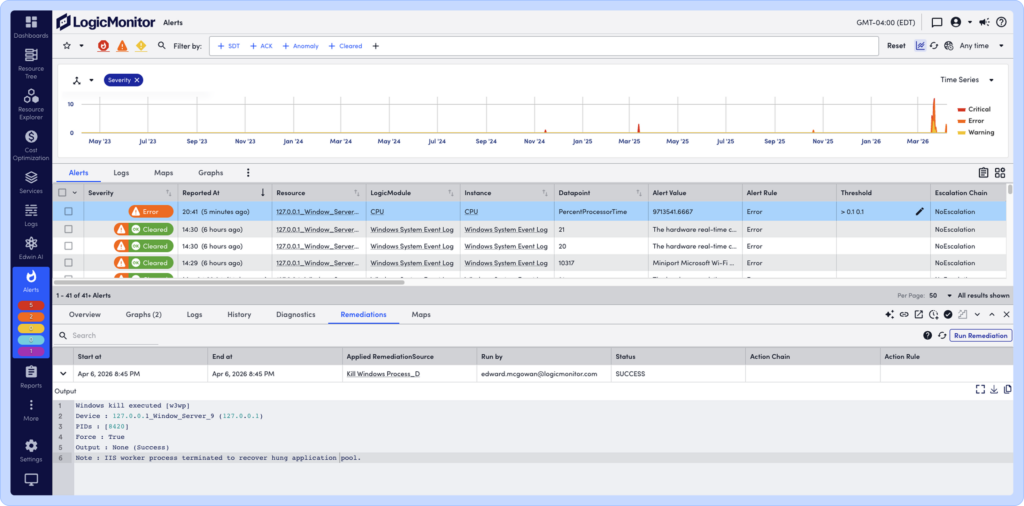
Automated Diagnostics and Remediation: See how this CPU alert was resolved automatically with an automated remediation that killed the process.
The Bigger Picture: Autonomous Operations
Automated Diagnostics & Remediation is a major step toward autonomous IT operations.
By combining real-time data capture with automated action, LogicMonitor enables closed-loop workflows that:
Detect issues instantly
Diagnose root causes with full context
Resolve common problems automatically
And because it integrates with LogicMonitor’s Edwin AI, every diagnostic and remediation event will feed future intelligence—powering smarter recommendations and increasingly autonomous systems.
Why Now: The Shift to Self-Healing Infrastructure
Today’s hybrid environments are too complex for fully manual operations. Alert volumes are rising, systems are more distributed, and downtime is more costly than ever.
By embedding automation directly into the alert lifecycle, Automated Diagnostics & Remediation empowers teams to:
Eliminate MTTR for repeat issues and reduce it for others
Boost operational efficiency with automation built into incident workflows
Improve reliability with faster, repeatable resolution
Scale operations without adding headcount
Maximize observability ROI by reducing manual effort
This is the evolution of observability—from visibility to action.
Availability and Pricing
Automated Diagnostics & Remediation is part of LogicMonitor’s Advanced and Signature Platform packages or as an add-on to any existing contract.
Customers have access to diagnostic and remediation executions based on their license tier, with additional execution capacity available for high-volume environments and MSPs.
Want to see Automated Diagnostics & Remediation in action?
Request a demo to experience how LogicMonitor can automatically diagnose and resolve issues, so your team can focus on innovation, not firefighting.
What’s the difference between Automated Diagnostics and Automated Remediation?
Automated Diagnostics captures real-time data to identify root causes when an issue occurs. Automated Remediation builds on that insight by automatically executing corrective actions—resolving issues without manual intervention.
Why is Automated Diagnostics and Remediation important for hybrid observability?
Hybrid environments are complex and constantly changing. Automated Diagnostics & Remediation ensures observability doesn’t just surface issues, it actively responds to them in real time, reducing downtime and improving service reliability.
What is Automated Diagnostics and Remediation in LogicMonitor?
It’s a LogicMonitor capability that automatically runs diagnostic scripts and remediation workflows when alerts fire. It captures real-time troubleshooting data and can take predefined actions—like restarting services or clearing processes—to resolve issues instantly.
How Automated Diagnostics and Remediation reduce MTTR?
It eliminates delays across the entire incident lifecycle. Diagnostics provide immediate context, and remediation can resolve issues automatically—reducing or even eliminating the need for human intervention and dramatically lowering MTTR.