

API Performance Testing: Key Considerations for Modern APIs
APIs that pass functional tests can still fail spectacularly under load. Here is how to design performance tests that surface real-world failure modes.


Denton Chikura

The quick download:
An API that passes all your functional tests can still bring down your system under load. Performance testing is where you find out before users do.
-
Load testing, stress testing, and soak testing answer different questions; running only one type means leaving entire failure categories untested.
-
Realistic test data and traffic patterns are the difference between a performance test that gives you confidence and one that gives you a false sense of safety.
-
Response time degradation under increasing load is often non-linear. Systems that look fine at 2x traffic can collapse at 3x.
-
Integrate performance tests into your CI/CD pipeline so regressions are caught at the code change level, not during a production incident.
API performance testing focuses on determining how well an Application Programming Interface (API) performs under various conditions. Testing ensures software applications deliver a smooth, efficient user experience, especially since APIs connect different software components and services.
This article delves into the importance of API performance testing, key metrics, and
Important best practices. We look at various aspects of API performance testing in the modern context. The aim is to provide insights and strategies for ensuring the highest quality and reliability of your web applications and APIs.
Summary of key API performance testing concepts
Here is the list of key topics covered in the article.
| Best Practices | Description |
|---|---|
| Why API performance testing matters | Monitoring performance supports post-deployment and continuous application success. It proactively resolves potential issues and communicates product quality and health to key stakeholders. |
| Key metrics in API performance testing | An API’s performance is measured using a combination of thresholds and assertions on metrics like response time, uptime, and successful HTTP status codes. |
| Real user data for API performance testing | By storing and capturing user traffic, we can create the most realistic test scenarios that reflect our application’s real-life usage. |
| Derive SLOs and SLAs from performance metrics | By testing for SLOs and SLAs using the right measurements and context, we can guarantee a high level of service for the API. |
| Include synthetic monitoring in your testing efforts. | The more realistic a scenario, the more likely a real issue will be caught by monitoring. Synthetic monitors follow this principle and allow engineers to create tests that match the actual usage of the API. |
| Include multi-level infrastructure monitoring in your testing efforts. | Monitoring all the differing infrastructure layers like load balancers, databases, and CDNs provides greater insight into performance testing results and the root causes for potential defects. |
| Support for all types of APIs | Supporting multiple types of APIs such as REST, GraphQL, and SOAP allows for maximum flexibility. |
| Support for microservices and serverless computing | Microservices and serverless computing are newer components in software system design. Tools that support these components and designs maximize compatibility within an organization. |
Why API performance testing matters
Monitoring performance is pivotal in ensuring that applications succeed post-deployment and work optimally over time. Performance directly impacts user experience, system reliability, and overall product perception. When performance lags or, worse, comes to a standstill, users cannot use your product. API performance monitoring provides ongoing insights into the application’s operational health and efficiency and prevents escalation into larger problems that could cause significant disruption.
Another crucial aspect of performance monitoring is its role in proactive problem resolution. Performance monitoring tools detect anomalies, unusual patterns, and performance bottlenecks, enabling developers to address issues promptly. The proactive approach improves application reliability and enhances users’ trust and confidence in the product. It is invaluable in the fast-paced tech industry, where even minor issues can lead to significant downtime or user dissatisfaction.
Finally, performance monitoring is instrumental in communicating the quality and health of a product to a broader audience. It provides tangible data and insights to inform stakeholders about the current state of the application. You can foster a culture of transparency in cross-functional teams, and ensure development goals align with business objectives and customer expectations.
Key metrics in API performance testing
Measuring API performance is a multi-faceted process that involves the evaluation of various metrics like response time, uptime, and successful HTTP status codes. Developers can set specific thresholds and assertions for each metric to establish performance benchmarks, monitor deviations, and implement improvements. We covered all performance metrics in detail in the previous chapter on API performance monitoring and only give an overview below.
Response time
Response time is crucial, as it measures the speed at which the API processes a request and returns a response, directly impacting the user experience. A slow response time can lead to user frustration and reduced engagement with the application.
HTTP status codes
Successful HTTP status codes are integral to measuring API performance. These codes provide immediate feedback about the success or failure of an API request so you can quickly identify issues in communication between the API and its clients. Monitoring these status codes allows developers to track API health and diagnose problems,
Uptime
Uptime measures the API’s availability and reliability over time, indicating how often it is operational and accessible to users. High uptime percentages are essential for maintaining user trust and satisfaction, especially for APIs that support critical functions of an application.
API performance testing best practices
We recommend the following strategies for optimizing your API performance testing efforts.
#1 Real user data for API performance testing
Developers capture and analyze actual user traffic to create test conditions that closely mimic the real-world use of their applications. Real-user data provides invaluable insights into how users interact with the application, such as common usage patterns, typical user workflows, and potential stress points within the system. Developers can then design tests that accurately reflect diverse user interactions and ensure the application is thoroughly vetted for real-life scenarios.
The advantage of using real-user data for creating tests is multi-fold. For example, organizations can
- Identify and replicate specific scenarios that might not have been anticipated during the initial development phase—such as unusual user behaviors or rare action combinations.
- Optimize the user experience and fine-tune the application based on authentic feedback.
- Uncover performance bottlenecks and scalability issues under realistic load conditions, leading to more robust and resilient applications.
Utilizing real-user data to create test scenarios is an effective strategy that ensures applications are rigorously and realistically tested. The approach goes beyond theoretical or simulated testing models as it incorporates the complexity and unpredictability of genuine user behavior.
#2 Derive SLOs and SLAs from performance metrics
You can grade your service level objectives (SLOs) and service level agreements (SLAs) by testing comprehensively for factors like response time, error rates, throughput, and uptime. Organizations can establish a clear benchmark for service quality by setting and adhering to specific metric targets. Using the correct testing results and contextualizing them within the API’s particular needs and usage patterns is essential for guaranteeing a high level of service.
Organizations ensure user satisfaction and long-term success by setting realistic, ambitious SLOs and SLAs based on comprehensive metrics. Continuous testing also ensures APIs meet the evolving needs of users and keep pace with the dynamic nature of the digital landscape.
It is helpful to use API performance testing tools that support SLA and SLO measurement.
#3 Include synthetic monitoring in your testing efforts
Synthetic monitoring is the process of simulating user interactions with an API, offering a controlled yet authentic testing environment. You can replicate the typical behavior of users and various conditions under which the API is accessed to provide a comprehensive evaluation of the API’s performance, reliability, and functionality. Advanced synthetic monitoring tools can:
- Configure monitoring scenarios for various client types and test different stages of the user application path.
- Test intermediary services like DNS and CDN
- Simulate API requests from different geographic locations.
- Operate round the clock, which is critical for testing outside peak usage hours for applications that serve a global user base.
Developers can have a comprehensive overview of all synthetic monitors. For example, here is an overview dashboard of a collection of monitors. It contains vital information about the test performance, areas for improvement, and test statistics like trigger time and number of runs.
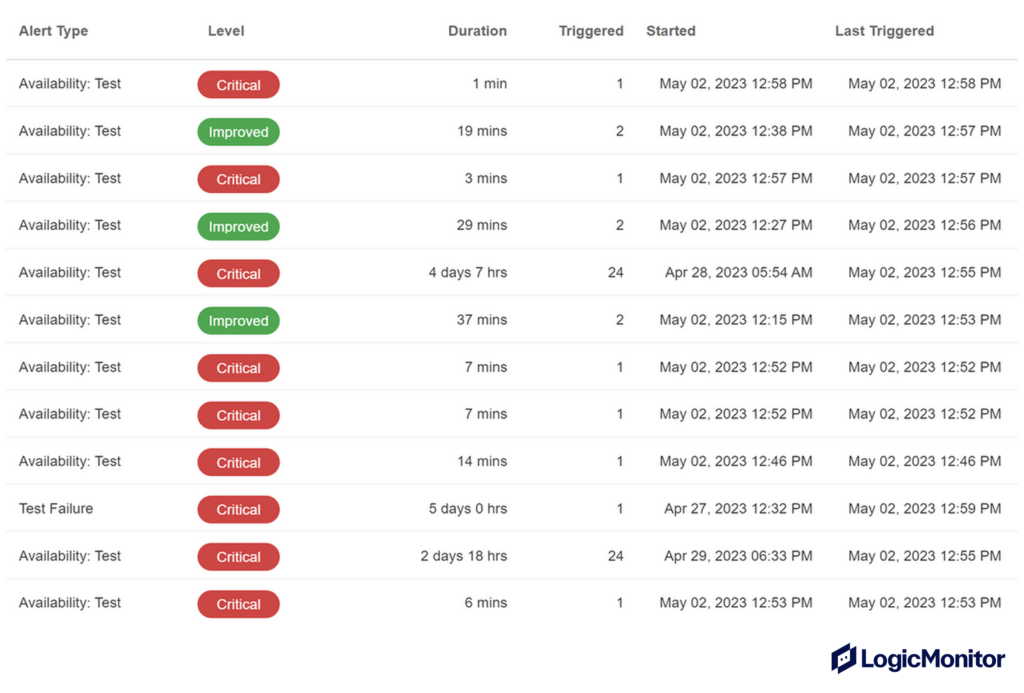
You can keep track of historical performance data and test for consistency after application upgrades. This level of realism in testing is crucial for detecting issues that might only manifest under specific or complex user interactions, ensuring that the API remains robust and reliable under a wide range of scenarios. In essence, the advantages of synthetic monitors lie in their ability to create detailed, realistic testing scenarios that prepare the API for the complexities of real-world operation, ultimately contributing to a smoother, more reliable user experience.
#4 Include multi-level infrastructure monitoring in your testing efforts
Multi-level infrastructure monitoring is a comprehensive approach to performance analysis that involves scrutinizing various layers of an organization’s technology stack. IT teams monitor components such as load balancers, databases, and CDNs to gain deeper insights into how these elements interact and affect overall API performance. This method is essential in providing a holistic view of the system’s health and performance.
Load balancers, for example, play a crucial role in distributing network traffic and ensuring high availability, while databases are central to data storage and retrieval processes. Monitoring these layers individually and collectively helps pinpoint performance bottlenecks, identify system inefficiencies, and understand one layer’s impact on another. This depth of analysis is key to ensuring the reliability and stability of the IT infrastructure.
Furthermore, multi-level infrastructure monitoring aids in diagnosing the root causes of potential defects. With a detailed view of each layer, IT professionals can trace issues back to their origin, whether in the network, server, application code, or database. It also allows for predictive analysis, enabling teams to anticipate and mitigate potential issues before they escalate into major problems. For instance, real-time data on server load and database performance can help forecast potential downtime or slowdowns,
In essence, multi-level infrastructure monitoring is not just about maintaining the status quo; it’s about actively improving system performance and reliability, ensuring the infrastructure can support the organization’s objectives and adapt to future technological changes.
Key features in API performance testing solutions
Apart from the basics outlined above, modern trends require API performance testing solutions to support the following.
Support all types of APIs
APIs come in various formats, each with protocols and use cases. For example,
- Representational State Transfer(REST), known for its simplicity and flexibility, is widely used for web services and mobile applications.
- GraphQL, a query language and runtime for APIs, is gaining prominence as it offers more efficient data loading in complex systems with interrelated data.
- Simple Object Access Protocol (SOAP) is often preferred for enterprise-level applications requiring high security and transactional reliability.
- gRPC, a modern, high-performance RPC (Remote Procedure Call) framework, is especially suited for microservices architecture, where it enables efficient communication between services with support for multiple programming languages.
An API performance testing tool significantly enhances its utility by supporting all these APIs. It offers maximum flexibility to organizations that utilize different API architectures for various operational aspects.
This versatility in supporting multiple API types is not just about compatibility; it’s about enabling organizations to seamlessly integrate and manage their diverse digital ecosystems. It simplifies the management process, reduces the need for multiple tools, and ensures consistency in monitoring and maintenance practices.
Moreover, such comprehensive support is critical for future-proofing an organization’s technology stack. As the organization grows and its needs evolve, the ability to adapt and incorporate different API types without the need for additional tools or significant changes in the existing infrastructure is a significant advantage.
Work for microservices and serverless computing environments
Microservices architecture breaks down applications into smaller, independent components, each performing a specific function. This modular approach allows for easier maintenance, quicker updates, and better scalability, as individual microservices can be developed, deployed, and scaled independently. On the other hand, serverless computing takes this a step further by abstracting the server layer, allowing developers to focus solely on the code without worrying about the underlying infrastructure. This model is highly efficient for event-driven architectures and can save costs, as resources are consumed only when the code is executed.
For organizations adopting these modern architectures, having tools that support the testing of microservices APIs and APIs built in serverless computing environments is essential. These tools must be capable of managing and monitoring the more dynamic and distributed nature of these systems.
In microservices, for instance, different APIs may be written in various programming languages and use different data storage technologies, requiring tools to handle this heterogeneity. Similarly, serverless functions scale up and down rapidly and require testing tools that provide real-time monitoring and performance metrics.
By supporting these architectures, API performance testing tools ensure that organizations leverage the full potential of microservices and serverless computing. Organizations can stay agile and responsive to changing market demands and technological advancements, maintaining a competitive edge in the fast-paced world of software development.
Conclusion
API performance testing is a cornerstone of modern software development. It ensures that applications meet and exceed the expectations set by users and stakeholders. You can enhance API performance testing efforts by utilizing real-user data for test creation, strategically implementing synthetic monitors, and integrating multi-level infrastructure monitoring. API performance testing tools should support various API types, including those used in microservices and serverless computing. By adhering to these principles, organizations can derive meaningful SLOs and SLAs from performance metrics, guaranteeing a high level of service that aligns with the dynamic demands of the digital age. This holistic approach to performance monitoring addresses current challenges and paves the way for future innovations and continuous improvement in software quality and user satisfaction.
NEWSLETTER
Subscribe to our newsletter
Get the latest blogs, whitepapers, eGuides, and more straight into your inbox.
SHARE
CHAPTERS
- API monitoring tools: must-have features for the modern API landscape
- REST API vs. GraphQL: Key Considerations for API Monitoring and Development
- API Performance Monitoring: Key Metrics and Best Practices
- API Gateway Timeout: Causes and Solutions
- API Performance Testing: Key Considerations for Modern APIs
- Microservices Monitoring Strategies and Best Practices
- API Observability: Benefits and Strategies
- API Monitoring: Best Practices, Benefits and Solutions
- API Monitoring: Metrics, Challenges and Best Practices
- Web API vs. REST API: Comparing RESTful and Non-RESTful Web APIs
- API Architecture Patterns and Best Practices
- API Metrics: What and Why of API Monitoring
Test your APIs before production. Monitor them relentlessly after.
LogicMonitor closes the loop between performance testing and production monitoring, so you know exactly how your APIs behave under real-world load.
FAQs
What is the difference between load testing and stress testing?
Load testing applies a target level of expected or peak traffic to measure how an API performs under normal operating conditions, validating that you meet performance targets. Stress testing pushes the API beyond expected capacity to find the breaking point and understand failure behaviour. Load testing tells you if you meet your SLA; stress testing tells you what happens when you exceed it.
How much load should I simulate in an API performance test?
Start with expected average traffic, then test at peak load, then at 2–3x peak load as a safety margin. Use real traffic profiling data (endpoint distribution, request sizes, authentication patterns) rather than synthetic uniform load. Unrealistic test traffic gives false confidence. If you have seasonal peaks, test at those levels specifically.
How do I include authentication in API performance tests?
Pre-generate authentication tokens or API keys before the test run rather than authenticating during the test, to avoid skewing latency results with auth overhead and prevents overloading your auth service. For OAuth flows, generate token pools in advance and ensure tokens have a TTL long enough to last the duration of the test.
Should API performance tests run in CI/CD pipelines?
Yes, integrating lightweight performance tests into CI is one of the highest-leverage places to catch regressions at the code change level. Run smoke-level load tests on key endpoints in every pipeline. Run full soak and stress tests in a pre-production environment on a scheduled basis or before major releases, where longer runtimes are acceptable.
© LogicMonitor 2026 | All rights reserved. | All trademarks, trade names, service marks, and logos referenced herein belong to their respective companies.