

BGP Local Preference
LOCAL_PREF is BGP’s primary tool for controlling outbound traffic within an AS. A higher value means a more preferred path. Here’s how it works, how to configure it, and how to use it for effective traffic engineering.


Denton Chikura

The quick download:
LOCAL_PREF is the most powerful BGP attribute for outbound traffic engineering, it’s shared across all iBGP peers and evaluated first, meaning it trumps AS_PATH, MED, and most other attributes in path selection.
-
LOCAL_PREF is set on the router receiving the route from an external peer, then propagated to all iBGP peers, changes to one router’s policy can shift outbound traffic across the entire AS.
-
The default value is 100; higher values are more preferred. Setting 200 on one path and leaving the other at 100 creates a clear primary/backup relationship.
-
LOCAL_PREF cannot be seen by external ASes, it is stripped from routes before they are advertised to eBGP neighbors.
-
Standardize your LOCAL_PREF scale across your organization (e.g., 200 = primary, 150 = secondary, 100 = backup) and document it so any engineer can understand your routing intent from the configuration alone.
Many actBGP is a routing protocol that is unique among its peers. Unlike internal gateway protocols (IGPs) such as OSPF or EIGRP, which use metrics to determine the best path, BGP selects the best path to a particular destination using a series of attributes. These attributes are examined in a specific order to determine the next hop.
BGP is designed to determine the “preferred path” by going through a series of attributes in a specific order. For a particular destination, if there are two or more paths to that destination, each attribute for each path is compared to determine which route is best. If there is a tie for any particular attribute, the next attribute in order is compared until one path wins out over the other. These BGP attributes provide you with much more granular control over how you forward your traffic and to which autonomous systems (ASes) you forward that traffic, instead of just going for the shortest path based on a metric.
The very first attribute that is examined is called Local Preference, often written as LOCAL_PREF. This attribute is exchanged between internal BGP (iBGP) peers within a single AS. It is used to determine the most preferred outbound path from the local AS to reach a particular prefix in another AS. The higher the local preference of a particular prefix, the more preferred it is.
Note that in Cisco’s implementation of BGP, the first parameter that is examined even before LOCAL_PREF is Weight. Some additional vendors have adopted the use of Weight, but it is not an official part of the BGP spec in RFC 4271. Weight, in the strictest sense, is not really a BGP attribute since it is only locally significant to the router in which it has been configured, and it is never included in any BGP updates.
Summary of Key Concepts
The following table summarizes some of the most important characteristics of the LOCAL_PREF attribute.
| Preferred Outbound Path | The LOCAL_PREF attribute is used to determine the preferred outbound path from the local AS. |
| Shared Between iBGP Peers | LOCAL_PREF is an attribute shared between iBGP peers within an AS. |
| Well-Known and Discretionary | The attribute must be recognizable by all BGP speakers, but it is not mandatory to be included in a BGP update. |
| Never Shared Between eBGP Peers | Any BGP router that receives a LOCAL_PREF attribute from an eBGP peer must ignore it (except in the case of BGP confederations). |
| 32-Bit Value | LOCAL_PREF is a positive integer represented by 32 bits, with a default value of 100. |
| Highest Local Preference Wins | The higher the LOCAL_PREF value, the more preferred the route is. |
Explanations
BGP uses a hierarchical structure of ASes to perform its function. In most typical scenarios, routing is done within each AS using an IGP, while BGP is used to determine the routing between ASes. Thus, when trying to reach a particular destination outside the local AS, BGP must determine via which eBGP peering packets should be sent to get to their destination.
Conceptual Understanding of LOCAL_PREF
LOCAL_PREF is a BGP attribute used to determine what exit point out of the local AS will be used to reach a particular destination. Take a look at the following diagram: Notice that AS 100 has two “exit points” to reach destinations outside the local AS, via R1 and R2.d object that indicates the AS which is authorized to originate a particular prefix. Along with the RPKI, these technologies introduce mechanisms that help mitigate hijacking and malicious attacks on your internet routing.
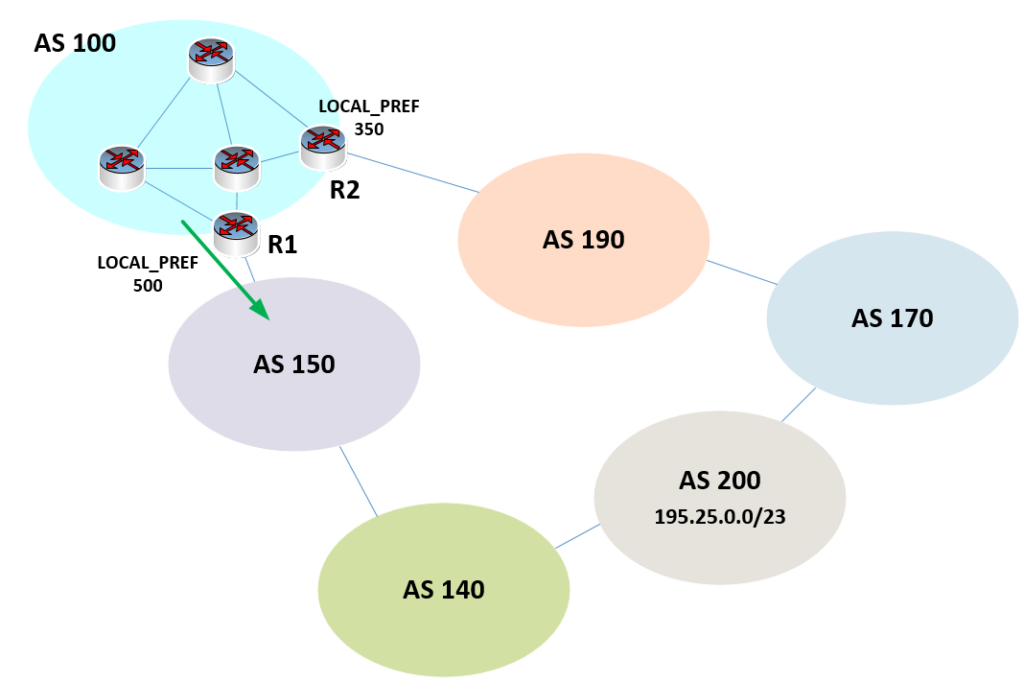
The 195.25.0.0/23 network found in AS 200 is advertised to its neighboring ASes. These advertisements reach AS 100, so the routers within AS 100 have a BGP-learned path to the 195.25.0.0/23 network.
In the diagram, we also see a series of iBGP peers found within AS 100. These routers can direct traffic to AS 200, which is where the destination network resides, via one of two paths: either via R1 using the eBGP peering with AS 150 or via R2 using the eBGP peering with AS 190. As the administrator of AS 100, suppose you prefer to send all traffic destined for 195.25.0.0/23 via AS 150, and for this reason, you configure the LOCAL_PREF for this destination via R1 to be 500 and via R2 to be 350. Since the higher LOCAL_PREF is preferred, traffic destined for this network will be routed via R1.
How Is LOCAL_PREF Modified?
The above example allows us to conceptually understand how LOCAL_PREF affects routing. However, how and where is it actually applied? There are several ways to change LOCAL_PREF values:
- By Prefix: This is what was done in the above example. The LOCAL_PREF for the particular prefix can be modified using various modifiers when BGP updates are shared between BGP peers.
- By Neighbor: It is possible to change the LOCAL_PREF on a particular neighbor such that all prefixes obtain a higher LOCAL_PREF via that neighbor.
Both of the above scenarios will be described in detail in the following examples.
Configuration Examples
The following examples show how LOCAL_PREF can be modified from the default value to influence the routes taken by outgoing traffic from a hypothetical AS 50. Note that Cisco IOS routers are being used in these examples. Take a look at the following diagram:
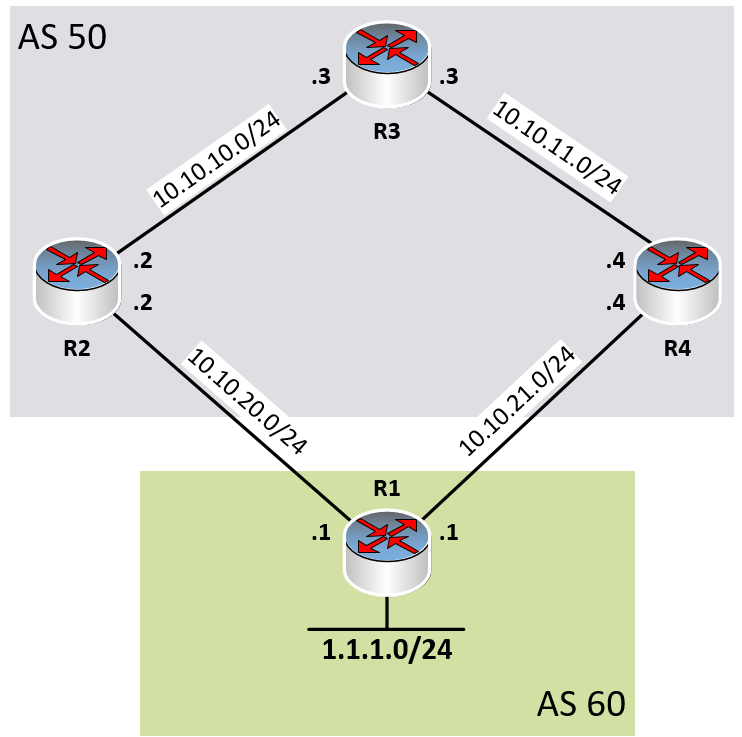
Note the following:
- The four routers are assigned router IDs as follows:
- R1: 1.1.1.1
- R2: 2.2.2.2
- R3: 3.3.3.3
- R4: 4.4.4.4
- R2, R3, and R4 have become iBGP peers within AS 50.
- R1 has established eBGP peering with R2 and R4.
- R1 is advertising the 1.1.1.0/24 prefix to both R2 and R4.
- R3 learns about the 1.1.1.0/24 prefix from both R2 and R4 via its iBGP peerings.
- LOCAL_PREF is set to the default value of 100 for all routes shared within AS 50.
Let’s take a look at the BGP table of R3:
R3#show ip bgp
BGP table version is 2, local router ID is 3.3.3.3
Status codes: s suppressed, d damped, h history, * valid, > best, i - internal,
              r RIB-failure, S Stale
Origin codes: i - IGP, e - EGP, ? - incomplete

   Network          Next Hop            Metric LocPrf Weight Path
* i1.1.1.0/24       4.4.4.4                  0    100      0 60 i
*>i                 2.2.2.2                  0    100      0 60 i
As you can see, both R2 and R4 are listed as possible next hops to reach the 1.1.1.0/24 network. Also note that the value of the LocPrf in the BGP table for both paths is set to the default of 100.
So which does R3 choose as the best path? Well, using the list of BGP attributes, the first attribute that differs between the two paths is the router ID. BGP will choose the lowest router ID as the best path when all previous attributes are equal.
You can determine the router ID of your BGP neighbors by using the show ip bgp neighbors command. In this particular case the router IDs of R2 and R4 happen to be the same as the values in the Next Hop column above. This is not always true, but is true in this case based on the configuration implemented.
As you can see from the above, the “>” symbol appears in the second row, which indicates that the next hop of 2.2.2.2, which is R2, will be used to route traffic to 1.1.1.0/24, not R4.
Changing LOCAL_PREF of a BGP Neighbor
Let’s say we want to ensure that all traffic headed outside AS 50 is sent via R4 and not via R2. We can specify this behavior by changing the local preference assigned to a particular neighbor. In other words, we can configure R4 to inform R3 within its updates that it has a higher LOCAL_PREF than other potential exit points from the local AS.
To do this, we apply the following configuration to R4:
R4(config)#router bgp 50
R4(config-router)#bgp default local-preference 300
This command is actually applied to the BGP configuration of AS 50, to which R4 belongs. The command sets the default LOCAL_PREF of R4 to 300. Since the LOCAL_PREF of R2 remains at its default value of 100, and since R4 will inform its iBGP neighbors of its new higher LOCAL_PREF value, all iBGP neighbors within the AS will prefer R4 over R2 for all prefixes.
Let’s take a look at R3’s BGP table again:
R4#show ip bgp
BGP table version is 3, local router ID is 3.3.3.3
Status codes: s suppressed, d damped, h history, * valid, > best, i - internal,
              r RIB-failure, S Stale
Origin codes: i - IGP, e - EGP, ? - incomplete

   Network          Next Hop            Metric LocPrf Weight Path
*>i1.1.1.0/24       4.4.4.4                  0    300      0 60 i
* i                 2.2.2.2                  0    100      0 60 i
Notice the value of LocPrf for the first row, which corresponds to R4 now being 300 while the LocPrf for R2 remains at the default value of 100. Also notice that the “>” symbol is indicating that R4 is now the preferred next hop.
All routes advertised by R4 into AS 50 via iBGP peerings will have a LOCAL_PREF value of 300.
But what if we want to change the LOCAL_PREF only for a particular prefix and not for all the prefixes advertised by R4?
Changing LOCAL_PREF for a Particular Prefix
Let’s first remove the change to the LOCAL_PREF we applied to R4 in the previous section.
R4(config)#router bgp 50
R4(config-router)#no bgp default local-preference 300
Let’s also modify our topology a bit, like so:
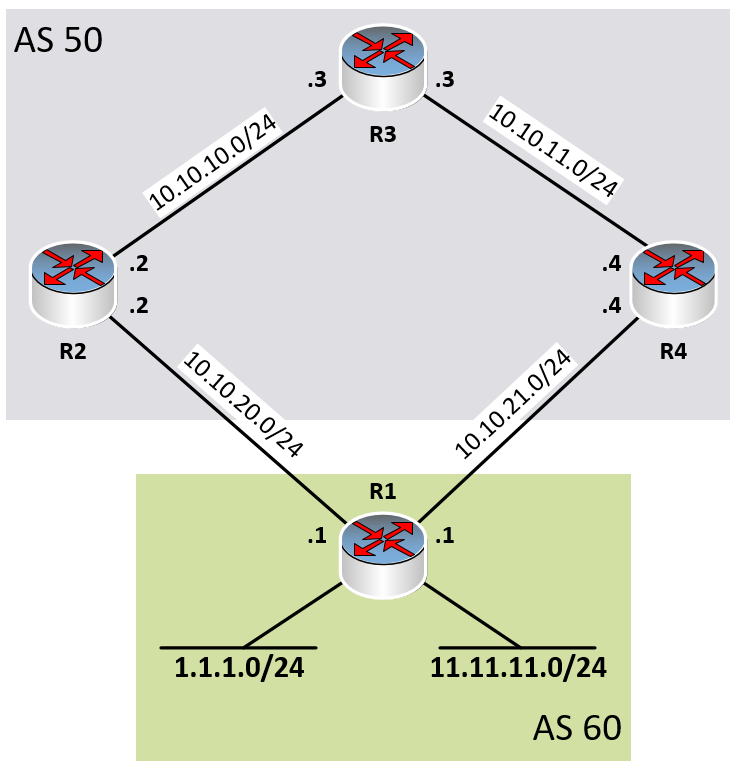
Let’s attempt to modify the LOCAL_PREF of the 1.1.1.0/24 network without modifying that of the 11.11.11.0/24 network. To do so, we will use route maps.
Let’s take a look at our initial BGP table in R3, with default values for LOCAL_PREF:
R3#show ip bgp
BGP table version is 2, local router ID is 3.3.3.3
Status codes: s suppressed, d damped, h history, * valid, > best, i - internal,
              r RIB-failure, S Stale
Origin codes: i - IGP, e - EGP, ? - incomplete

   Network          Next Hop            Metric LocPrf Weight Path
* i1.1.1.0/24       4.4.4.4                  0    100      0 60 i
*>i                 2.2.2.2                  0    100      0 60 i
* i11.11.11.0/24    4.4.4.4                  0    100      0 60 i
*>i                 2.2.2.2                  0    100      0 60 i
As expected, both the 1.1.1.1/24 and 11.11.11.0/24 prefixes prefer the path via R2 due to router IDs, as before.
Now let’s configure a route map that will modify the LOCAL_PREF of the 1.1.1.0/24 prefix so that packets to this destination will be routed via R4. Configuration changes will be applied to R4. To do so, we must do the following:
- Create an access list (ACL) that will match the specific prefix.
- Create a route map that will match IP addresses in the ACL and set a new value for the LOCAL_PREF.
- Apply that route map to an eBGP peering to modify the value of LOCAL_PREF for matched prefixes.
R4(config)#ip access-list standard LP_MATCH
R4(config-std-nacl)#permit 1.1.1.0 0.0.0.255
R4(config-std-nacl)#exit
R4(config)#

R4(config)#route-map LOCALPREF permit 10
R4(config-route-map)#match ip address LP_MATCH
R4(config-route-map)#set local-preference 300
R4(config-route-map)#exit
R4(config)#

R4(config)#router bgp 60
R4(config-router)#neighbor 10.10.21.1 route-map LOCALPREF in
Let me explain what is going on above. When R4 receives a BGP update from R1 (neighbor 10.10.21.1), any prefixes in that BGP update that match the ACL will have the LOCAL_PREF of the next hop set to 300. The in keyword simply indicates that the route map is only applied to BGP updates that are incoming. Any outgoing BGP updates, such as those from R4 to R1, will not be affected.
Thus, when R4 advertises the route to 1.1.1.0/24 to its iBGP neighbors, it will advertise a LOCAL_PREF value of 300. When it advertises the 11.11.11.0/24 network, it retains the default LOCAL_PREF of 100.
Let’s take a look at the resulting BGP table in R3:
R3#show ip bgp
BGP table version is 2, local router ID is 3.3.3.3
Status codes: s suppressed, d damped, h history, * valid, > best, i - internal,
              r RIB-failure, S Stale
Origin codes: i - IGP, e - EGP, ? - incomplete

   Network          Next Hop            Metric LocPrf Weight Path
*>i1.1.1.0/24       4.4.4.4                  0    300      0 60 i
* i                 2.2.2.2                  0    100      0 60 i
* i11.11.11.0/24    4.4.4.4                  0    100      0 60 i
*>i                 2.2.2.2                  0    100      0 60 i
As you can see, only the 1.1.1.0/24 prefix has a LOCAL_PREF value of 300 as advertised by R4, so R4 is chosen as the next hop while the 11.11.11.0/24 prefix retains its routing via R2.
Caveats
Take the following into account when using local preference to modify routing:
- The LOCAL_PREF attribute is well-known. This means that all BGP routers must be able to receive these values and interpret them correctly.
- The LOCAL_PREF attribute is discretionary. This means that a BGP update may be sent without this value set. If an iBGP peer receives a BGP update without the LOCAL_PREF value set, it assumes a default value of 100.
- The LOCAL_PREF attribute must not be advertised within an update between eBGP peers. If this is done, the eBGP peer must ignore it.
Recommendations
Remember that the LOCAL_PREF attribute influences outgoing traffic. This can be useful in many scenarios, as described below.
Multihoming
Large enterprises that run BGP on the edges of their networks may connect to the Internet via multiple ISPs. This is called multihoming. Using LOCAL_PREF, outgoing traffic can be adjusted in multihoming scenarios to ensure the desired traffic patterns. For example, load balancing between ISPs can be achieved by modifying the LOCAL_PREF of particular destinations. Alternatively, routing can be configured such that one ISP is the primary outgoing path, while the second is used only as a backup.
Inter-ISP Routing
LOCAL_PREF can also be adjusted to ensure that traffic patterns between ISPs conform to the desired behavior. Remember that BGP is not about the best path but the preferred path. This preferred path may not be the fastest or most efficient but may be preferred for other reasons, such as cost, inter-ISP agreements, or traffic volume contracts.
Conclusion
Local preference is a powerful BGP attribute that aids in granularly modifying routing so that the preferred path is chosen. Because it is the first attribute to be examined, it makes BGP routing more efficient and can supersede any other attributes that may result in unpreferred routing. Primarily used to modify outgoing traffic, it can also be used to influence incoming traffic with the appropriate agreements between the entities administering neighboring ASes.
CHAPTERS
NEWSLETTER
Subscribe to our newsletter
Get the latest blogs, whitepapers, eGuides, and more straight into your inbox.
SHARE
Validate your outbound routing policy is working.
LogicMonitor provides network teams real-time visibility into active paths and routing table state, so you can confirm your LOCAL_PREF policies are directing traffic to the right upstreams, and catch drift when something changes unexpectedly.
FAQs
What is BGP LOCAL_PREF?
LOCAL_PREF (Local Preference) is a well-known discretionary BGP attribute used to indicate the preferred outbound path from within an AS to reach a destination in another AS. It is shared only between iBGP peers and is not propagated to external BGP neighbors. A higher LOCAL_PREF value means the path is more preferred. The default value is 100 on most platforms.
How does LOCAL_PREF differ from MED?
LOCAL_PREF and MED serve opposite purposes. LOCAL_PREF controls outbound traffic, it tells routers within your AS which exit point to use when sending traffic to a destination. MED (Multi Exit Discriminator) influences inbound traffic, it’s sent to neighboring ASes to suggest which entry point they should use when sending traffic to you. LOCAL_PREF is iBGP-only; MED is communicated to external neighbors.
What is the default LOCAL_PREF value?
The default LOCAL_PREF value on most BGP implementations is 100. When comparing two paths, the one with the higher LOCAL_PREF wins. If both paths have the same LOCAL_PREF, BGP moves to the next attribute in the path selection order (AS_PATH length). Setting all primary paths to 200 and backup paths to 100 is a common convention for creating clear primary/backup routing policies.
Can LOCAL_PREF be seen by neighboring ASes?
No. LOCAL_PREF is an iBGP-only attribute and is stripped from route advertisements before they are sent to eBGP neighbors. External ASes cannot see your LOCAL_PREF values, which means changes to LOCAL_PREF only affect routing within your own AS. To influence how external ASes route traffic to you, you must use attributes that are shared across eBGP sessions, such as MED or AS_PATH prepending.
© LogicMonitor 2026 | All rights reserved. | All trademarks, trade names, service marks, and logos referenced herein belong to their respective companies.