

BGP Reset
A BGP reset tears down a peering session and forces full route table re-exchange, in a large network, that’s a major event. Learn what causes resets, when they’re unavoidable, and how to minimize their impact.


Denton Chikura

The quick download:
A BGP reset is never a trivial event, it forces full route table re-exchange, can cause temporary routing black holes, and in large networks, the convergence ripple can affect peers beyond your immediate neighbors.
-
Hard resets drop all session state and require a full routing table exchange; soft resets (using Graceful Restart or route refresh) achieve policy updates without tearing down the session.
-
BGP’s slow convergence by design means resets can leave routes unavailable for seconds to minutes depending on network size and configuration.
-
Unplanned resets from hold timer expiry, hardware failure, or software bugs are the most disruptive, monitoring for early warning signs prevents these from becoming outages.
-
Use soft resets (route refresh or pre-stored Adj-RIBs) whenever possible for policy changes, and always schedule hard resets during change windows with rollback plans in place.
Many activities essential to modern life depend on the internet, and the internet depends on the Border Gateway PrBGP is a routing protocol developed specifically for routing traffic on the internet. Internal gateway protocols (IGPs) route traffic between routers within an Autonomous System (AS), where each AS is composed of a collection of dozens or even hundreds of routers. In contrast, BGP is a path-vector routing protocol that is primarily used to route traffic between these autonomous systems. BGP is extraordinarily scalable, a characteristic that is necessary for routing on the worldwide internet. Nevertheless this scalability requires that BGP be extremely slow to converge, compared to IGPs.
Because of this characteristically slow convergence, an unscheduled or uncontrolled BGP reset can potentially cause significant problems on any large network, which can have repercussions well beyond the boundary of any single ISP.
A BGP reset occurs when an established BGP peering between two routers is disrupted for any number of reasons. In this article, we’ll be examining BGP resets, their causes, their potential consequences, and how to mitigate against their occurrences.
Introduction
It is important to understand how BGP resets occur and the extent of detrimental consequences they may have on a network. This, in turn, helps engineers to design BGP in order to minimize their occurrences, and when they are necessary, to minimize their impact on the network. As such, we’ll attempt to answer the following questions in concise and easy-to-understand language:
- What is a BGP reset?
- What can cause a BGP reset?
- What are the repercussions if a BGP reset occurs unintentionally?
- When are they necessary, and how do you safely execute them?
We’ll examine some best practices as well as configuration examples that will help to deal with BGP resets.
Explanations
BGP Convergence
The very same design and method of implementation of the BGP protocol that deliver its massive scalability cause BGP’s extremely slow convergence/reconvergence. This is not a disadvantage of BGP as many may incorrectly conclude—it is so by design. Faster reconvergence can increase the possibility of flapping routes and momentary routing loops. Such failures can have worldwide consequences, affecting tens of millions of people and thousands of businesses.
Like most networking protocols, there are ways to tweak BGP so that this convergence time is minimized under the appropriate circumstances, but these adjustments must be made with great care to avoid even momentary routing mishaps.
Arguably, the best way to counteract the havoc that can be caused by reconverging BGP topologies is to mitigate events that cause reconvergence. In other words, attempt to maintain a stable BGP topology at all costs.
One of the most common causes of inadvertent BGP reconvergence is a BGP reset, which occurs when an established BGP peering between two routers is disrupted. So avoiding them altogether is ideal. However, sometimes BGP resets are needed. In such cases, they should be performed in a controlled manner, minimizing their impact on the network as a whole.
What Is a BGP Adjacency?
BGP routers establish neighbor adjacencies or peerings with other BGP routers before exchanging prefix and routing information. These adjacencies are established by going through a specific process of traveling through various neighbor adjacency states. This process can be visualized in a flow diagram which indicates the states the BGP routers go through to establish this adjacency, which is officially called a Finite State Machine or FSM. Please read our article on BGP states to learn more.e RPKI, these technologies introduce mechanisms that help mitigate hijacking and malicious attacks on your internet routing.
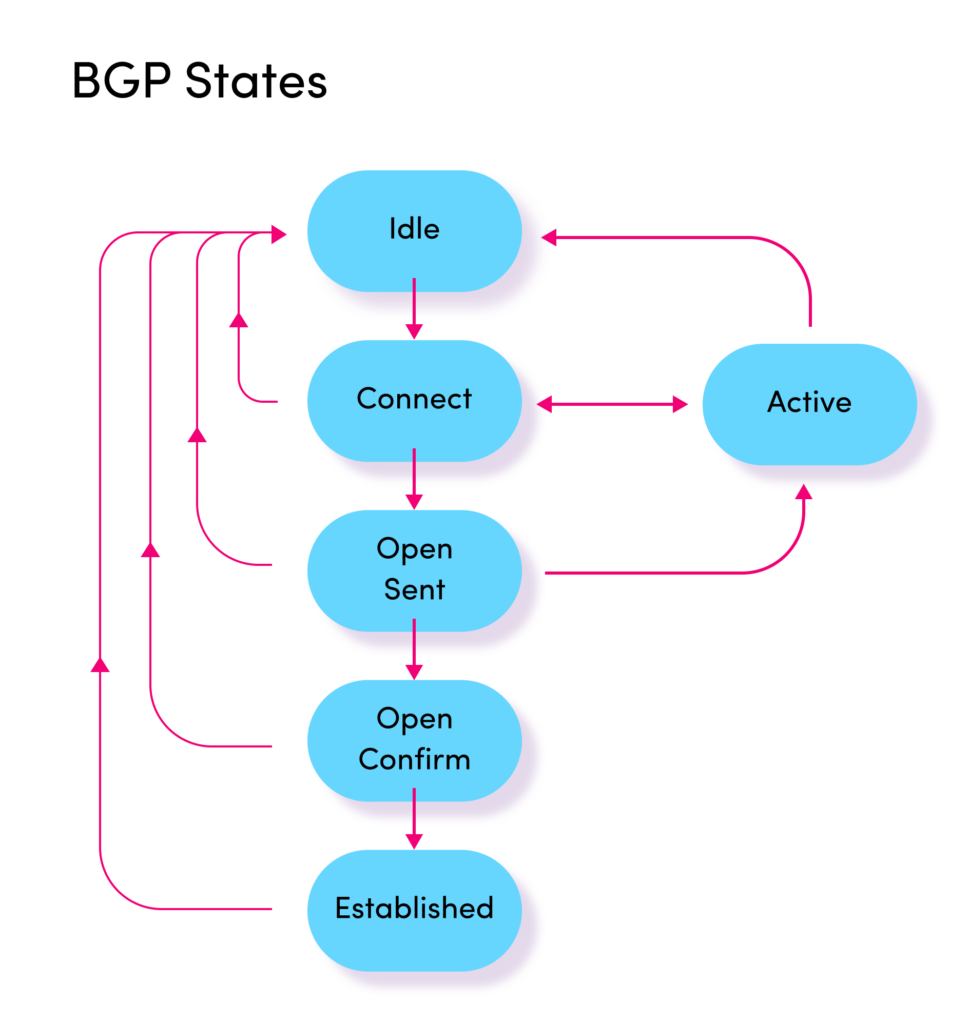
The meaning of each state is not important at this point, but you can perceive from this diagram that the FSM process can become quite complex and time-consuming. Once the process reaches the “Established” state, the BGP peers are said to be adjacent, and they begin exchanging prefixes and routing information.
What Is a BGP Reset?
A BGP reset occurs when an established BGP peering between two routers is disrupted for any number of reasons. When such a disruption occurs:
- The BGP session between the two peers is torn down, and the state in the FSM returns to the “Idle” state.
- All prefixes learned from BGP neighbors are immediately removed from the BGP table and routing table.
- The BGP routers involved attempt to initiate a new BGP session.
- If/when a new session is established, prefixes are once again exchanged and installed in the BGP and routing tables.
After a reset occurs but before the adjacency is re-established, connectivity to and from these neighboring networks is disrupted, and remote networks must now reroute packets to those destinations over other paths, assuming alternatives are available. However, remember that BGP also redistributes routes to IGPs for routing with ASes, which adds further disruption to the routing patterns within an AS when a reset occurs.
The whole process of a BGP reset takes time, and the larger the area of the internet that is affected, the longer it takes for both BGP and IGP routing protocols to reconverge. But that’s only half the process. A reset also includes the reestablishment of BGP peerings.
When an adjacency is re-established, the whole process takes place again, the prefixes will start being exchanged, and they’ll be placed in the BGP and routing tables. Any BGP or IGP peers further downstream will also have to change their routing tables once again.
A reset can trigger a disruption in routing that ripples outwards to all routers and networks dependent upon stable and accurate routing information. This is a process that takes time, consumes network, CPU, and memory resources on a multitude of devices, and disrupts traffic within the affected region of the network.
What Can Cause a BGP Reset?
A BGP reset can be caused by any of the following events:
- A loss of connectivity between BGP peers
- Making a configuration change to the BGP parameters on one of the peers
- Manually clearing BGP sessions by an administrator
Loss of Connectivity
This event can be the result of any network malfunction that disrupts connectivity between BGP peers, such as:
- A complete loss of connectivity due to a cut cable or failed link
- The blocking of TCP port 179, which is used by BGP
- Misconfiguration of the IGP or the static routing that establishes connectivity between the two peers; one of the prerequisites of BGP peering is that the BGP peers are able to reach each other via an IGP or static routing
- A hardware failure on a BGP router
Configuration Changes
Depending upon the vendor of the BGP router, making changes to BGP routing policies, router IDs, or IP addresses of particular interfaces may cause an immediate reset to occur.
Manual BGP Reset
An administrator can and sometimes must perform a manual BGP reset for any newly configured or modified routing policies to take effect. This can be done by issuing the appropriate commands in the CLI of the BGP router. As we will see shortly, the method of the manual BGP reset will play a major role in the type of network disruption you can expect from such an action.
Manual BGP Reset Types
When a BGP reset must be applied, it should be done so with care. Modern BGP routers have several features that make resets less disruptive while at the same time achieving the purpose of the reset. When a reset is necessary, there are three types of resets that can be performed.
Hard Reset
A hard reset tears down a peering session, including the established TCP connection, and removes all routes that have been learned via that session from the local BGP and routing tables. Once complete, communication resumes going through the steps of the FSM, and finally, exchanging routes between peers resumes. This is the most disruptive and time-consuming manual reset that can take place.
Hard resets should be avoided in a production network due to the disruptions that they can cause, as described earlier in this article.
Soft Reset
A soft reset, sometimes called a soft reconfiguration, uses stored prefix information to apply the policy and configuration changes and to reactivate BGP without tearing down existing peering sessions. Stored update information is used for this purpose, so this method uses more memory, allowing the new BGP policies to be applied without disrupting the network.
Soft reset is useful when a BGP session is reset, but the TCP session of the peering remains intact. In the event that a BGP process fails, and the TCP session is terminated, soft reset won’t provide you with any benefits, since in such a case, that stored update information is still removed, and the forwarding table is cleared. To resolve this issue, we use graceful reset.
Graceful Reset
The graceful reset capability goes a step further than the soft reset feature. When enabled, a BGP speaker will express its ability to preserve forwarding state during BGP restart. If both BGP speakers support it, both routers will temporarily retain the BGP tables in memory even if the TCP session is torn down until it is reestablished. Graceful reset is further described in RFC 4724.
Dynamic Soft Reset
Also known as route refresh, this method is the most preferred. After making policy changes, when route refresh is applied, the local router simply sends a message to the BGP neighbor requesting that all prefixes be resent, with no disruption at all. In addition, unlike the soft reset option, it doesn’t use up any more memory on the BGP device. Route refresh for BGP-4 is described in RFC2978.
Mitigating Unwanted Resets
Unwanted resets due to loss of connectivity beyond your control (such as a cut fiber cable due to construction, for example) are simply a part of life. In these cases, you must ensure that the rest of the BGP configurations are sufficient to quickly reconverge with as little disruption as possible. That means that sufficient alternative paths should be provisioned beforehand, and solid network redundancy principles should be employed.
Inadvertent resets due to human error, whether due to misconfigurations on the BGP routers themselves or in the intervening network infrastructure between BGP routers, are also avoidable if the correct network modification procedures are followed. These include observing maintenance windows, configuring rollback policies, and preparing predetermined contingency plans for worst-case scenarios.
How to Perform Manual BGP Resets
Let’s take a look at a practical example of how to perform BGP resets on BGP routers without disrupting traffic. For these examples, we’ll be using Cisco IOS routers. Take a look at the following network topology:
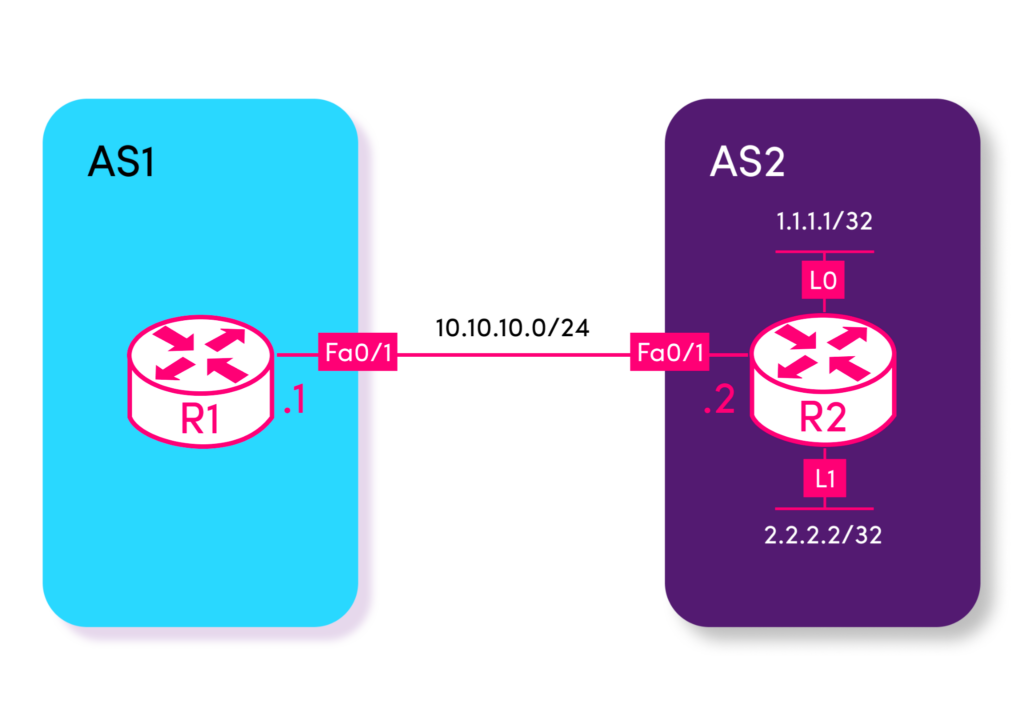
Here, BGP is configured between R1 and R2 so that they become BGP neighbors, and R2 advertises both loopback networks to R1. To achieve this, the following commands are entered on Router 1:
R1(config)#router bgp 1
R1(config-router)#neighbor 10.10.10.2 remote-as 2
And the following is entered on Router 2:
R2(config)#router bgp 2
R2(config-router)#neighbor 10.10.10.1 remote-as 1
R2(config-router)#network 1.1.1.1 mask 255.255.255.255
R2(config-router)#network 2.2.2.2 mask 255.255.255.255
Performing a Soft Reset
By default, the soft BGP reset feature is disabled on Cisco routers and is enabled on a per-BGP-neighbor basis. To enable it on R1 in our topology, we apply the following commands:
R1(config)#router bgp 1
R1(config-router)#neighbor 10.10.10.2 soft-reconfiguration inbound
This command with the soft-reconfiguration inbound keywords tells R1 to save the routing information received (inbound) from R2 in an unmodified state (free from any route-maps or other mechanisms that may adjust BGP parameters upon receipt of the BGP message). This is saved in a specialized memory construct called the Adjacency Routing Information Base In Table or the Adj-RIB-In table. This is done so that when the reset happens, that information is not lost only to be relearned.
At this point, we can make any BGP routing policy changes required on R1.
Once those are complete, we can perform the soft reset to activate the changes:
R1#clear ip bgp 10.10.10.2 soft inAny policy changes applied will now be in effect without the BGP session going down or disrupting any routing in the process.
The downside to this option is that it uses more memory, and because BGP tables can get quite large, the memory usage is not trivial.
Performing a Dynamic Soft Reset
A better alternative to a soft reset is a dynamic soft reset, but it can only be used if both BGP routers support it. This route refresh capability is actually enabled by default on all modern Cisco IOS routers and those of most other vendors as well.
Let’s first remove the soft reset configuration from our previous example.
R1(config)#router bgp 1
R1(config-router)#no neighbor 10.10.10.2 soft-reconfiguration inbound
Now, at this point, we can make any policy changes required. Once complete, let’s see what command we should use to correctly reset the BGP session, using the context-sensitive help:
R1#clear ip bgp 10.10.10.2 ?
  all          	All address families
  flap-statistics  Clear flap statistic
  in           	Soft reconfig inbound updates
  ipv4         	Address family
  ipv6         	Address family
  l2vpn        	Address family
  nsap         	Address family
  out          	Soft reconfig outbound updates
  rtfilter     	Address family
  slow         	Forcefully clear slow-peer status and move it to original
               	update group
  soft         	Soft reconfig inbound and outbound updates
  topology     	Routing topology instance
  vpnv4        	Address family
  vpnv6        	Address family
  <cr>
Notice that there are three options, marked in red, that include the soft reconfig option: in, out, and soft. All three options can be used to soft-reconfigure the BGP session, focusing on incoming, outgoing, or both types of updates. Let’s apply this to inbound updates:
R1#clear ip bgp 10.10.10.2 inYou will see the following message on R1:
R1#
BGP: 10.10.10.2 sending REFRESH_REQ(5) for afi/safi: 1/1
This Syslog message states that a refresh request has been sent to the BGP neighbor, which is specifically designed to perform the soft reconfiguration. A Syslog message also appears on R2 like so:
R2#
BGP: 10.10.10.1 rcvd REFRESH_REQ for afi/safi: 1/1
The result is a refreshed exchange of prefixes with the new policies applied, without any disruption in the routing of traffic.
Performing a Hard Reset
It is not possible to use the clear ip bgp command to perform a hard BGP reset. However, a hard reset can be indirectly achieved by shutting down the interface through which the peering is established, changing the router ID of one of the peers, or changing the IP address that is used for the source of the peering. Any of these actions will disrupt BGP peerings and thus cause a hard reset. Such actions for resetting BGP should be avoided at all costs on production networks.
Conclusion
BGP resets are sometimes a necessary part of network administration, while at other times, they are a result of a network malfunction that should be avoided at all costs. Because BGP is such a mission-critical part of large-scale, ISP, and worldwide networks, it is vital to ensure that all precautions are taken to avoid BGP resets. When they are necessary, do them appropriately to ensure minimal disruption to your networks.
CHAPTERS
NEWSLETTER
Subscribe to our newsletter
Get the latest blogs, whitepapers, eGuides, and more straight into your inbox.
SHARE
Detect BGP session instability before it becomes an outage.
LogicMonitor monitors BGP session state, reset events, and convergence health, giving your network team early warning of instability and enabling them to respond before a reset cascades into a wider routing disruption.
FAQs
What is a BGP reset?
A BGP reset is the teardown and re-establishment of a BGP peering session. When a session resets, all route information exchanged on that session is discarded and must be re-learned from scratch via a full routing table exchange. Resets can be intentional (triggered by an operator to apply policy changes) or unintentional (caused by hardware failures, software bugs, hold timer expiry, or network disruption).
What is the difference between a hard reset and a soft reset?
A hard reset tears down the BGP TCP session entirely, discarding all routing state. Both peers must re-establish the session and re-exchange complete routing tables. A soft reset applies policy changes without tearing down the session. Inbound soft resets use the BGP Route Refresh capability (RFC 2918) to request a re-advertisement from the peer; outbound soft resets use locally stored Adj-RIB-Out data to re-evaluate and re-advertise routes under the new policy.
What causes unplanned BGP session resets?
Common causes include: hold timer expiry (no KEEPALIVE received within the negotiated hold time, often caused by high CPU, network congestion, or routing daemon issues), NOTIFICATION message errors (capability mismatches, authentication failures, or malformed updates), TCP session failures (link down, MTU issues, or network path changes), hardware failures on the router or line card, and software bugs in the routing daemon. Each cause leaves a different signature in the session’s error counters and logs.
How does Graceful Restart reduce the impact of BGP resets?
BGP Graceful Restart (RFC 4724) allows a restarting router to maintain its forwarding state while the BGP session re-establishes. Neighboring routers preserve the routes they’ve learned from the restarting router and continue forwarding traffic, rather than immediately withdrawing those routes and causing a routing black hole. This significantly reduces the traffic impact of planned maintenance or software restarts, though it does not help with unplanned failures.
© LogicMonitor 2026 | All rights reserved. | All trademarks, trade names, service marks, and logos referenced herein belong to their respective companies.