

Inter-VLAN Routing
VLANs segment networks for security and performance, but inter-VLAN routing is needed when they must communicate. Here is how to configure it correctly.


Denton Chikura

The quick download:
Inter-VLAN routing is fundamental to modern network design, but misconfiguration is a common source of connectivity issues and security gaps.
-
Router-on-a-stick and Layer 3 switch approaches each have trade-offs in performance, cost, and management complexity.
-
VLAN mismatches between switches are one of the most common causes of inter-VLAN connectivity failures.
-
Monitoring inter-VLAN traffic helps detect unexpected flows that could indicate misconfiguration or a security breach.
-
Standardize VLAN-to-subnet mappings and document all inter-VLAN ACLs so you can quickly validate expected paths when troubleshooting unexpected traffic patterns.
In some cases, administrators must completely isolate VLANs and disallow any traffic between them. However, it is usually necessary to allow some traffic to flow between VLANs so certain services and systems are available on any network segment. That’s where inter-VLAN routing comes in.
Inter-VLAN routing enables routers or Layer 3 switches to route traffic between VLANs. Because the use case is so common, network administrators need to understand inter-VLAN routing.
In this article, we’ll take a closer look at the network fundamentals behind inter-VLAN routing, discuss how it works, and provide practical configuration examples so you can get hands-on with this powerful networking feature using the two common design patterns:
- The router on a stick model.
- Layer 3 switch inter-VLAN routing.
Why you need inter-VLAN routing
To begin with, let’s walk through a brief refresher on the fundamentals of networks and VLANS before we get into the details of Inter-VLAN routing. .
Hubs
Before network switches, hubs were used to interconnect network devices. Hubs are basic in the sense that they only replicate electrical signals. They take any traffic they receive from a device and transmit it to all ports.
This duplication creates very chatty and inefficient networks because all connected devices receive the traffic. Eventually, this is unsustainable on most networks, as it creates too much congestion.
Switches
Enter the network switch. Network switches provide the ability to identify which device traffic was destined for, based on a destination MAC address in the Ethernet frame. Because they can send traffic to a specific device instead of every device, switches are superior and dramatically reduce network congestion.
The problem of broadcasts
Despite their benefits, switches still have the problem of broadcast traffic. Broadcast traffic is sent to all ports on a switch, because broadcasts are intended to reach all hosts on a network. As the number of devices on the network increases, broadcast traffic can quickly overwhelm it.
While administrators can break up broadcasts by creating a new network with a second switch that isn’t connected to the original switch, that isn’t practical.
This is where VLANs come in.
The value of VLANs
Instead of introducing a new switch, administrators can use VLANs to break up broadcasts. A VLAN is a software-based version of adding a separate physical switch to segment a network.
With a VLAN, you can segment network broadcast domains virtually on the same switch. What does that mean? You can have one device on one VLAN, and another on another VLAN connected to the same switch. They will only hear other broadcast traffic from within their VLAN, as if they were connected to two different switches.
Another way of thinking of VLANs, is like the radios you may have used when you were a kid. If you and your friends were all on the same channel, you could all hear someone when they talked. The friend talking is a broadcast, and the channel is like a VLAN. If you moved to a different channel, you could no longer hear someone talking on the original channel.
In addition to breaking up broadcast domains, VLANs add a level of security via network segmentation. For instance, perhaps a company wants their HR department that handles sensitive employee data to be on a different VLAN than the marketing department. Separate VLANs can address that use case.
Limitations and problems with VLANs
The problem with segmenting networks into separate VLANs is that often at least some traffic needs to reach other VLANs on the network for practical reasons.
For example, do you want to put a DHCP server in each VLAN? No, it would make more sense to use one DHCP server.
Also, while it may sound good in theory to separate HR and marketing on the network, what about when someone in marketing needs to download a form from HR’s systems? Should they have to ask someone in HR to download it for them first? That’s clearly inefficient.
These are the cases where Inter-VLAN routing becomes necessary.
Inter-VLAN routing
Inter-VLAN routing is the ability to route, or send, traffic between VLANs that are normally blocked by default.
Switches and VLANs work at the MAC address Layer (Layer 2). Traffic can’t be routed between VLANs at Layer 2 based on MAC addresses. Therefore, routers (or Layer 3 switches) that use IP addresses (Layer 3) are required for inter-VLAN routing.
VLANs and subnets go hand in hand
VLANs don’t use IP addresses. However, VLANs can be paired with IP address ranges (subnets). It is a best practice to pair one subnet/IP address range with one VLAN. Most real-world implementations map VLANs to subnets.
Administrators can configure between subnets, allowing routing between VLANs or inter-VLAN routing. By using routing this way, administrators can balance network segmentation with the need to enable select traffic to transmit across VLANs and subnets.
How to Route Between VLANs
There are two main ways to accomplish inter-VLAN routing: the router on a stick model or Layer 3 switch inter-VLAN routing.
Generally, a Layer 3 switch will have better performance and less latency than the router on a stick. This is because the routing is handled in hardware instead of software with the Layer 3 switch vs. the router.
The inter-VLAN routing method chosen will largely depend on what hardware is available to the network administrator on the given network, so it is important to understand both concepts.
Below, we’ll walk through examples of how to configure inter-VLAN Routing with both methods.
How to configure router on a stick inter-VLAN Routing
We’ll use the router on a stick model for our first example. In this model, switches with multiple VLANs uplink to a single router. Although there is one physical uplink, the router uses virtual sub-interfaces. One sub-interface per VLAN is used and the router is configured to route traffic between the VLANs.
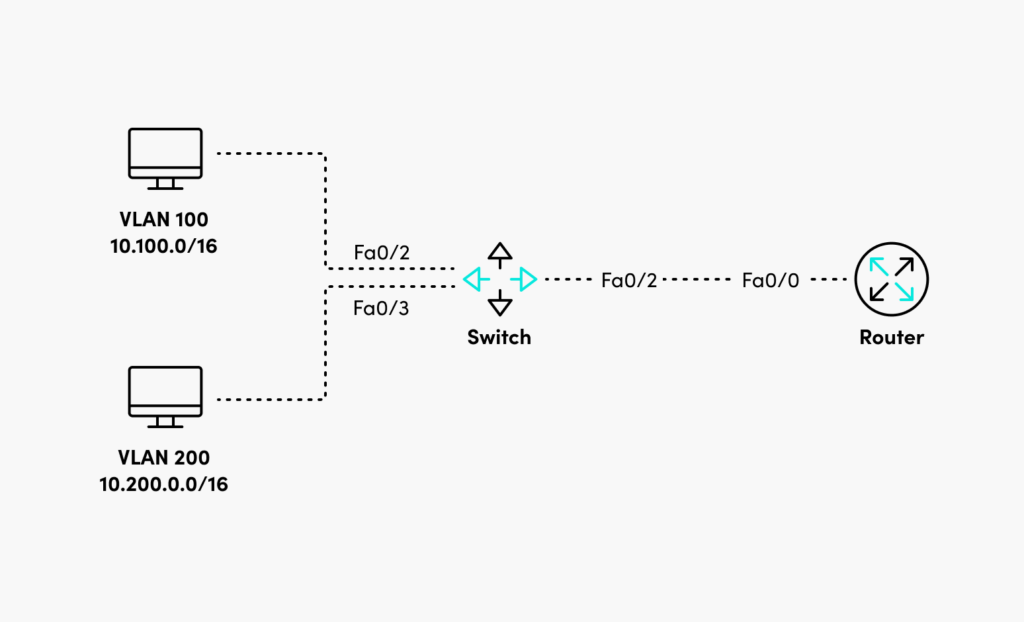
Following the diagram above, begin by selecting the uplink interface on the router and make sure the interface is online.
Router(config)#interface fastEthernet 0/0
Router(config-if)#no shutdown
Router(config-if)#exit
Next, create the first subinterface for VLAN 100. The encapsulation dot1q number must match the VLAN number.
Router(config)#interface fastEthernet 0/0.100
Router(config-subif)#encapsulation dot1Q 100
Router(config-subif)#ip address 10.100.0.1 255.255.0.0
Router(config-subif)exit
Finally, create the second subinterface for VLAN 200.
Router(config)#interface fastEthernet 0/0.200
Router(config-subif)#encapsulation dot1Q 200
Router(config-subif)ip address 10.200.0.1 255.255.0.0
Router(config-subif)#exit
Now the router will transmit traffic between each of the VLANs.
How to configure inter-VLAN routing with a Layer 3 switch
In addition to forwarding based on Layer 2 MAC addresses, Layer 3 switches can forward traffic based on IP address. Layer 3 switches introduce the ability to create Switch Virtual Interfaces (SVIs). SVIs are logical Layer 3 interfaces that allow the forwarding of traffic based on Layer 3 IP addresses.
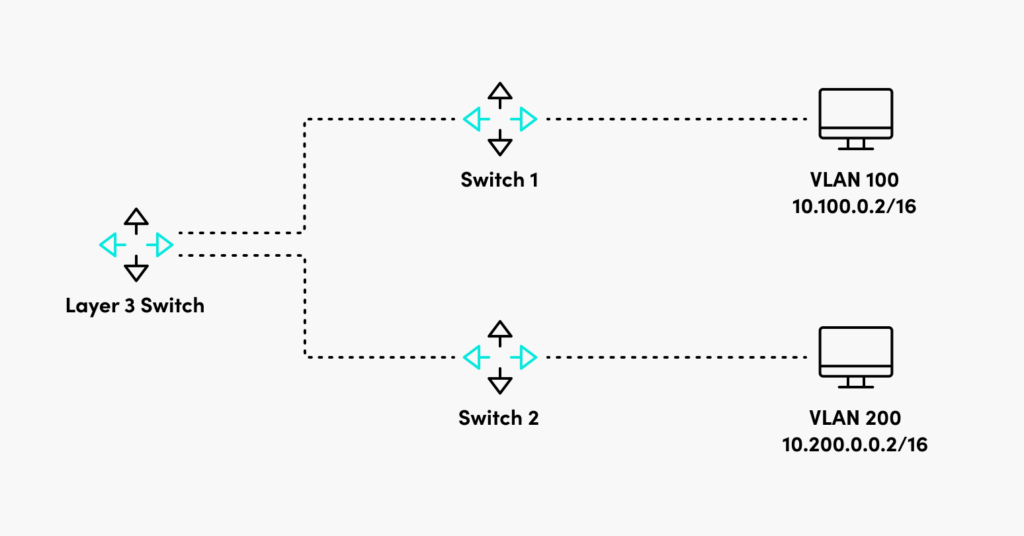
First following the topology outlined in the diagram above, enable routing functionality on the Layer 3 switch with the command below.
Layer3Switch(config)#ip routingNext, configure the VLANs on the Layer 3 switch to match what is configured on the Layer 2 switches.
Layer3Switch#vlan database
Layer3Switch(vlan)#vlan 100
Layer3Switch(vlan)#vlan 200
Next, configure the VLAN interfaces with IP addresses in their corresponding subnet.
Layer3Switch#configure terminal
Layer3Switch(config)#interface Vlan100
Layer3Switch(config-if)#ip address 10.100.0.1 255.255.0.0
Layer3Switch(config-if)#no shutdown
Now you have a Layer 3 switch that can route traffic between VLANs distributed on the network on various Layer 2 switches.
Conclusion
Inter-VLAN routing gives administrators a flexible tool to logically subdivide their networks that has the potential to enhance security and performance.
VLANs are one of the backbones of enterprise local area networks. They allow network segmentation to both reduce broadcast congestion and add a potential layer of security. That said, oftentimes it is necessary to allow some traffic from one VLAN to be routed to another VLAN.
Network administrators can accomplish this using inter-VLAN routing with a router or Layer 3 switch to route traffic between VLANs while still preserving broadcast domains.
CHAPTERS
- Network admin’s guide to synthetic monitoring
- Internet Exchange Point
- IT Transit
- The Benefits and Challenges of SD-WAN Architecture
- Free Online Network Tools Every Engineer Should Bookmark
- SD-WAN vs MPLS
- MQTT Broker
- Inter-VLAN Routing
- DNS Sinkhole
- How to Read a Traceroute
- Switching Loops
- SD-WAN Security
- IP Multicast
- DNS Tunneling
NEWSLETTER
Subscribe to our newsletter
Get the latest blogs, whitepapers, eGuides, and more straight into your inbox.
SHARE
Full Layer 2 and Layer 3 visibility in one platform.
LogicMonitor monitors switch ports, VLANs, routing tables, and network topology together, so you can quickly isolate inter-VLAN connectivity issues.
FAQs
What is a VLAN and why is inter-VLAN routing needed?
A VLAN is a logical network segment created at Layer 2 by tagging Ethernet frames. VLANs segment networks for security, performance, and management. By default, devices in different VLANs cannot communicate, inter-VLAN routing is needed to route traffic between VLANs at Layer 3.
What is router-on-a-stick inter-VLAN routing?
Router-on-a-stick is a legacy method where a single router interface connects to a switch trunk port and carries traffic for multiple VLANs using sub-interfaces. It is simple to configure but creates a single point of congestion, making it unsuitable for high-traffic environments.
What is a multilayer switch and how does it enable inter-VLAN routing?
A multilayer switch combines Layer 2 switching with Layer 3 routing. It routes traffic between VLANs using Switched Virtual Interfaces (SVIs). Because switching and routing happen in hardware, multilayer switches provide much higher performance than router-on-a-stick.
How do you troubleshoot inter-VLAN routing problems?
Start by verifying VLAN membership and trunk port configuration on the switch. Verify the Layer 3 interface (sub-interface or SVI) for each VLAN is up and has the correct IP address. Check that routing is enabled. Trace the path from source to destination, verifying ARP resolution and routing table entries at each Layer 3 hop.
© LogicMonitor 2026 | All rights reserved. | All trademarks, trade names, service marks, and logos referenced herein belong to their respective companies.