

Network admin’s guide to synthetic monitoring
Synthetic monitoring helps network admins isolate internet bottlenecks across IXPs, BGP, CDN, and SD-WAN, beyond what SNMP can see.


Denton Chikura

The quick download:
Modern networks demand visibility beyond your perimeter. Synthetic monitoring is how network admins see the internet.
-
See why SNMP and flow data miss critical internet and SaaS performance issues.
-
Learn how global synthetic tests reveal problems before users ever open a ticket.
-
Get a practical map of today’s internet stack (BGP, DNS, SD‑WAN, CDNs, IXPs) from a network admin’s perspective.
-
Start extending your monitoring strategy beyond the data center edge with synthetics you can pilot quickly.
Overview
As a network administrator, you are well acquainted with the Simple Network Management Protocol (SNMP), as well as a number of paid tools used to monitor private local and wide area networks. Monitoring traffic as it traverses the internet, however, is a different type of challenge — one that can’t be monitored with SNMP. Instead, administrators must use other methods to isolate performance bottlenecks scattered across the vast and complex web of public network components known as the Internet.
Synthetic monitoring triangulates problems by testing performance and reachability from hundreds of vantage points. It also complements your Domain Name Service (DNS), Content Delivery Network (CDN), and Border Gateway Protocol (BGP) monitoring to provide a comprehensive perspective.
In this guide, we’ll cover the technologies that make the Internet tick, such as:
- Internet Exchange Points (IXP)
- Software Defined Wide Area Network (SD-WAN)
- Border Gateway Protocol (BGP)
- IP Transit
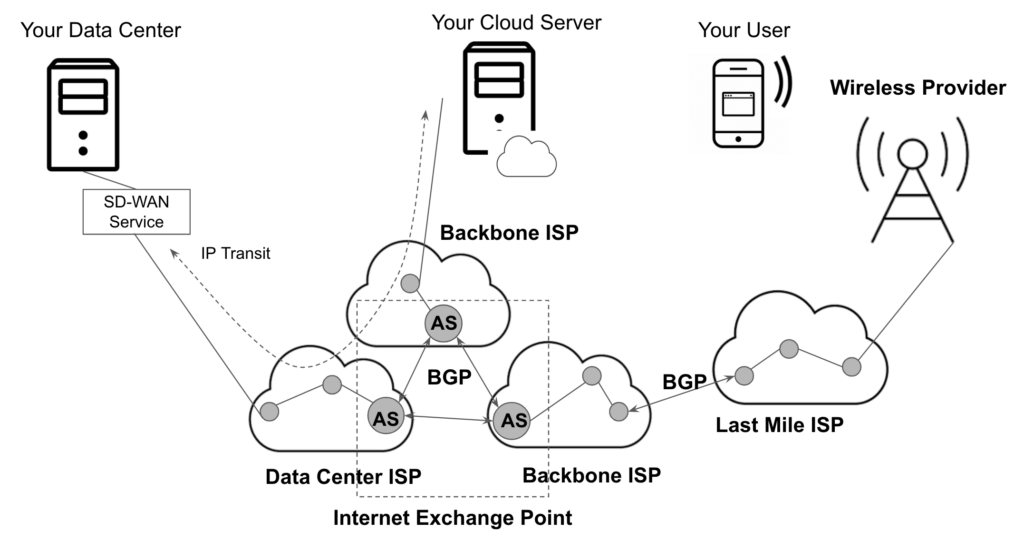
This guide also includes a list of free online tools available to help network engineers troubleshoot internet performance problems. The following diagram provides context for the concepts that will be covered in the chapters that follow.
CHAPTERS
- Network admin’s guide to synthetic monitoring
- Internet Exchange Point
- IT Transit
- The Benefits and Challenges of SD-WAN Architecture
- Free Online Network Tools Every Engineer Should Bookmark
- SD-WAN vs MPLS
- MQTT Broker
- Inter-VLAN Routing
- DNS Sinkhole
- How to Read a Traceroute
- Switching Loops
- SD-WAN Security
- IP Multicast
- DNS Tunneling
NEWSLETTER
Subscribe to our newsletter
Get the latest blogs, whitepapers, eGuides, and more straight into your inbox.
SHARE
See what SNMP misses
Get full-stack visibility across your internet infrastructure, from BGP and CDN to DNS and SD-WAN, with LogicMonitor.
FAQs
What is synthetic monitoring in networking?
Synthetic monitoring simulates network requests from distributed vantage points to test performance and reachability. Unlike SNMP, it monitors traffic as it traverses the public internet, across ISPs, CDNs, DNS resolvers, and BGP paths, giving network admins visibility into the full transaction path.
What is the difference between SNMP and synthetic monitoring?
SNMP monitors devices within your private network, routers, switches, and servers you control. Synthetic monitoring tests how traffic performs across the public internet. They are complementary: SNMP covers your infrastructure, synthetic monitoring covers the external network paths your traffic depends on.
What are Internet Exchange Points (IXPs) and why do they matter for monitoring?
Internet Exchange Points are physical locations where different ISPs exchange internet traffic. Performance bottlenecks at IXPs can cause latency spikes even when your own infrastructure is healthy. Monitoring the paths through IXPs helps diagnose whether slowdowns originate in your network or in external routing.
How does SD-WAN affect network monitoring?
SD-WAN dynamically routes traffic across multiple WAN links based on policy, which can make traditional monitoring less reliable if it only checks a single path. Monitoring SD-WAN requires visibility into each underlay link and the overlay path selection, including how traffic behaves when failover occurs.
© LogicMonitor 2026 | All rights reserved. | All trademarks, trade names, service marks, and logos referenced herein belong to their respective companies.