

SNMP Traps as Logs Overview
Last updated - 02 October, 2025
LogicMonitor enables the collection and processing of SNMP traps as log data. SNMP traps inherit log functionality including retention, queries, alerts, anomaly detection, and log correlation. Processing SNMP traps as logs gives greater insight into legacy systems and supports stateful alerting and alert suppression.
The LM Collector can process SNMP traps using one of the following LogicModules:
- LogSource—Provides templates that simplify configuration of log data collection and forwarding. LogSource is available for common log data sources such as Syslog, Windows Events, and Kubernetes Events. A LogSource includes details about what logs to get, where to get them, and which fields should be parsed before sent to LM Logs for ingestion. For more information, see LogSource Overview.
- EventSource—Provides definitive monitoring and alerting activity for non-numeric event-based data. An EventSource is a definition that instructs your Collector what information is collected or received, what resource the information is collected or received from, and when alerts are triggered on that information. For more information, see EventSource Configuration.
Note: You can only use either LogSource or EventSource at any given time. These methods cannot be used simultaneously to process SNMP traps as logs.
Note: A LogSource that is applied on a device is preferred over the LogSource applied on a Collector for processing the SNMP traps. In addition, a LogSource that is applied on a Collector is preferred over a Collector agent.conf property lmlogs.snmptrap.enabled that processes the SNMP traps.
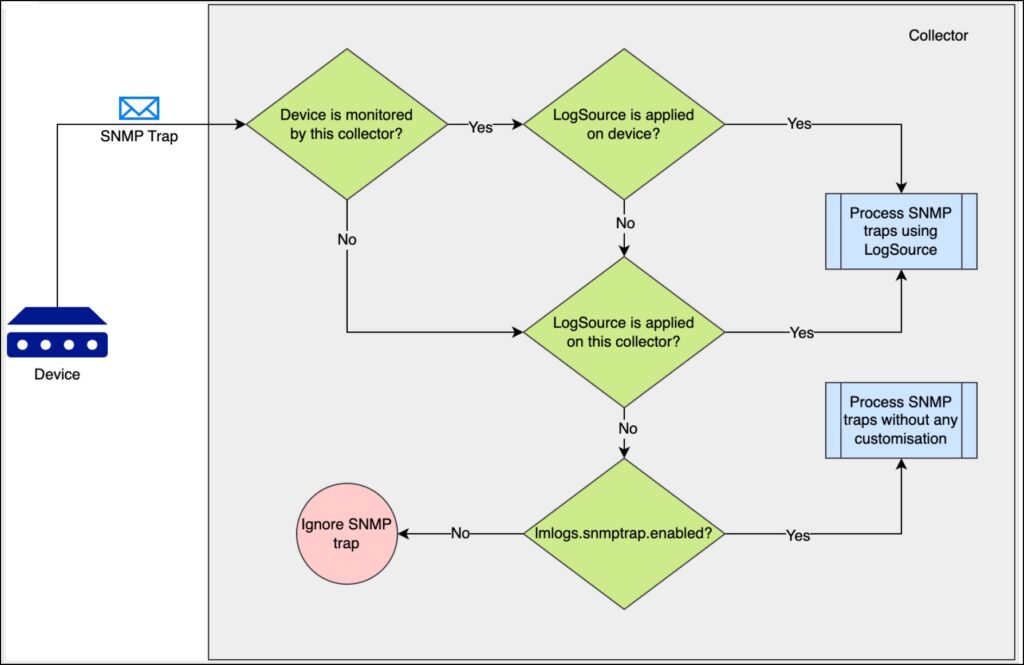
General Requirements for Leveraging Logs for SNMP Traps
- Collector version 34.500 or later. For information on upgrading the Collector, see Managing Collectors
- Access to LogicMonitor
